10 min read
Walk past the router shelf in any electronics shop and Wi-Fi 7 is now the default label, often with a speed figure in the tens of gigabits printed on the box. If your current router says Wi-Fi 6, or Wi-Fi 6E, it is fair to wonder whether you are already behind.
Key takeaways
- Wi-Fi 7 is IEEE 802.11be and Wi-Fi 6 is 802.11ax; Wi-Fi 6E extends Wi-Fi 6 into the 6 GHz band.
- Wi-Fi 7 adds 320 MHz channels, 4K QAM and Multi-Link Operation, which can steady latency across bands.
- Most gains need a new router, new devices that support the same features, and 6 GHz opened in your country.
- Upgrade if your router is Wi-Fi 5 or older or your fiber is around a gigabit; otherwise you can probably wait.
The honest answer for most homes is no, not yet. Wi-Fi 7 is a real step forward, and it does some clever things with the airwaves. But many of its gains only appear when the router and the device are both new, both support the same features, and your country has opened the right radio spectrum. Here is what actually changed between the two generations, what the headline numbers mean, and how to decide whether an upgrade is worth the money.
The names and the standards
Wi-Fi generations have two sets of names. The engineering standards come from the IEEE, the body that writes the 802.11 wireless specifications. The friendly numbers come from the Wi-Fi Alliance, the industry group that certifies products.
- Wi-Fi 6 is the Wi-Fi Alliance’s name for IEEE 802.11ax. The IEEE approved 802.11ax-2021 in February 2021 as a set of “enhancements for high-efficiency WLAN”, covering frequency bands between 1 GHz and 7.125 GHz. The Wi-Fi Alliance dates Wi-Fi 6 to 2018, before the IEEE standard was finalized.
- Wi-Fi 6E is Wi-Fi 6 extended into the 6 GHz band. The Wi-Fi Alliance says Wi-Fi 6 “introduced Wi-Fi in the 6 GHz band in addition to the 2.4 GHz and 5 GHz bands available in previous generations”.
- Wi-Fi 7 is IEEE 802.11be, officially titled “Enhancements for Extremely High Throughput”. The IEEE standard was approved on 26 September 2024 and published on 22 July 2025. The Wi-Fi Alliance launched its Wi-Fi CERTIFIED 7 program on 8 January 2024, before the standard was formally finished.
Did you know?
The Wi-Fi Alliance launched its Wi-Fi CERTIFIED 7 program on 8 January 2024, before the IEEE approved the 802.11be standard on 26 September 2024.
What Wi-Fi 6 brought
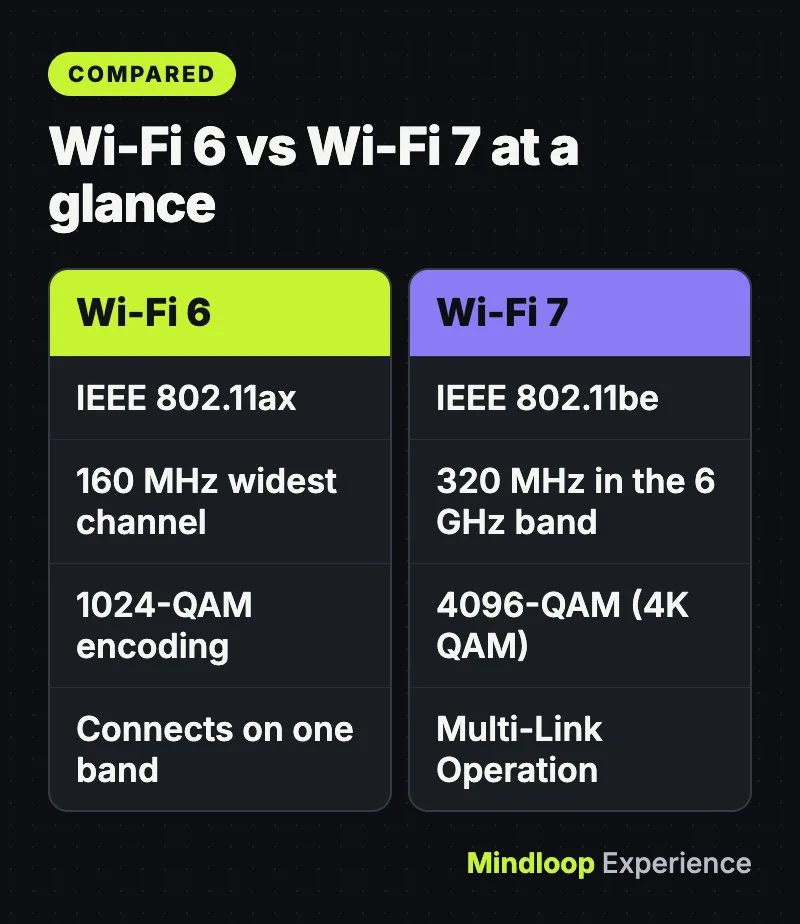
Wi-Fi 6 was mainly about coping with crowds rather than raw speed. Its key features, as listed by the Wi-Fi Alliance, include:
- OFDMA, which splits a channel into smaller pieces so the router can serve several devices in one transmission.
- Multi-user MIMO, letting the router send data to more devices at once.
- 160 MHz channels for higher bandwidth.
- 1024-QAM, a denser way of encoding data in the same amount of spectrum.
- Target wake time, which lets devices schedule when they wake to talk to the router, improving battery life. If battery is a worry, our guide to making your phone battery last longer covers the bigger drains.
For a home full of phones, laptops, TVs and smart plugs, those changes matter more than any peak figure.
Why 6 GHz is the real story
Older Wi-Fi shares the 2.4 GHz and 5 GHz bands with neighbors’ networks, Bluetooth devices and even microwave ovens. The 6 GHz band is new, wide and comparatively empty.
United States
On 23 April 2020 the Federal Communications Commission adopted rules making 1,200 megahertz of spectrum in the 6 GHz band (5.925 to 7.125 GHz) available for unlicensed use. The FCC said this would increase the spectrum available for Wi-Fi “by nearly a factor of five”. Low-power indoor devices can use the full 1,200 MHz; higher-power “standard power” devices got 850 MHz, controlled by an automated frequency coordination system that keeps them away from existing users such as utilities’ microwave links. In January 2026 the FCC approved further rules allowing more higher-power operation, according to the Wi-Fi Alliance.
United Kingdom
The UK opened less of the band, and only recently added more. Ofcom’s technical rulebook for licence-exempt devices, Interface Requirement 2030, added 5925 to 6425 MHz for Wi-Fi in April 2021. The October 2026 edition extends Wi-Fi to 6425 to 6585 MHz under the same low-power indoor and very-low-power conditions, giving 660 MHz in total. The regulations behind that change, SI 2026/1133, came into force on 10 November 2026. A separate set of regulations, SI 2026/1132, now allows higher-power devices across 5925 to 7125 MHz, but only under the control of an automated spectrum access service.
Why this matters: Wi-Fi 7’s widest channels need a lot of empty spectrum, and how much you get depends on where you live. Apple’s Wi-Fi 7 support page notes that 6 GHz features are “available only in regions that permit unlicensed Wi-Fi use in that spectrum”; elsewhere, devices fall back to 2.4 GHz and 5 GHz.
By the numbers
1,200 MHzUS 6 GHz for indoor devices
850 MHzUS standard power devices
660 MHzUK total for Wi-Fi
What Wi-Fi 7 adds
320 MHz channels
Wi-Fi 7 doubles the widest channel from 160 MHz to 320 MHz. Think of it as a motorway with twice as many lanes. The Wi-Fi Alliance says these channels “provide twice the throughput of Wi-Fi 6”, but they are only available in the 6 GHz band, and only in countries that have opened it.
4096-QAM (4K QAM)
QAM is the way a radio packs bits into each signal. Wi-Fi 7’s 4K QAM packs more bits into every symbol than Wi-Fi 6’s 1024-QAM, which the Wi-Fi Alliance says “achieves 20% higher transmission rates”. The catch is that denser encoding needs a very clean, strong signal, so you tend to get the benefit only when you are close to the router.
Also read: iPhone Prices in the UAE and Saudi Arabia (AED/SAR), eSIM and Where to Buy
Multi-Link Operation (MLO)
This is the feature most likely to make a noticeable difference. Older Wi-Fi devices connect on one band at a time. With MLO, the Wi-Fi Alliance says devices can “transmit and receive data simultaneously over multiple links”, for example on 5 GHz and 6 GHz together. The result is higher throughput, lower latency and better reliability, because if one band is busy or blocked the traffic can use the other. For video calls and online gaming, steadier latency often matters more than peak speed.
Smaller refinements
Wi-Fi 7 also lets the router assign several slices of a channel to a single device, and it uses more efficient acknowledgments. Neither shows up on the box, but both help squeeze more out of crowded airwaves.
Theoretical speed versus what you will see
The IEEE’s goal for 802.11be was a mode capable of at least 30 gigabits per second, measured inside the Wi-Fi system itself. That figure assumes the widest channels, the densest encoding and ideal conditions that almost never exist in a house with walls, neighbors and older devices.
Real-world speed depends on three things:
- Your broadband line. Wi-Fi cannot make your internet connection faster than the plan you pay for. For context, the FCC’s Broadband Speed Guide suggests about 25 Mbps for a single 4K video stream. A gigabit fiber line is a small fraction of what either Wi-Fi 6 or Wi-Fi 7 can theoretically carry.
- Your devices. A phone or laptop is usually less capable than a high-end router and may not support 320 MHz channels or every Wi-Fi 7 feature.
- Distance and walls. Higher-frequency signals generally lose strength faster with distance and through walls, so 6 GHz and the fastest modes work best in the same room or with a mesh system.
Where Wi-Fi 7 shines is moving data inside your home, such as backing up to a network drive, streaming games from a PC to a headset, or many people using the network at once.
Did you know?
The IEEE’s goal for 802.11be was at least 30 gigabits per second, while the FCC suggests about 25 Mbps for a single 4K video stream.
What your devices need
Both ends have to support a feature before you can use it. A new Wi-Fi 7 router will happily serve older Wi-Fi 6, 5 and 4 devices, but they will connect using their own, older capabilities.
Even “Wi-Fi 7” devices vary. Apple’s support page, updated in October 2026, says devices that support Wi-Fi 6E or Wi-Fi 7 can join Wi-Fi 7 networks, but “only these devices support all of the features of Wi-Fi 7”, listing, for example, iPhone 16 Pro and later Pro models, and MacBook Air with M5 chip or later. Check your own phone and laptop specifications for 802.11be, 320 MHz support and MLO.
The Wi-Fi Alliance also draws a distinction worth knowing. In an August 2026 post on buying a Wi-Fi 7 router, it says a box saying “Wi-Fi 7” is not the same as the Wi-Fi CERTIFIED 7 seal, which means the product has passed interoperability, security (including WPA3) and backward-compatibility testing. You can check a product in the Alliance’s online Product Finder.
Wi-Fi CERTIFIED 7™: driving next-level Wi-Fi® performance (YouTube)
Should you upgrade?
Upgrading makes sense if
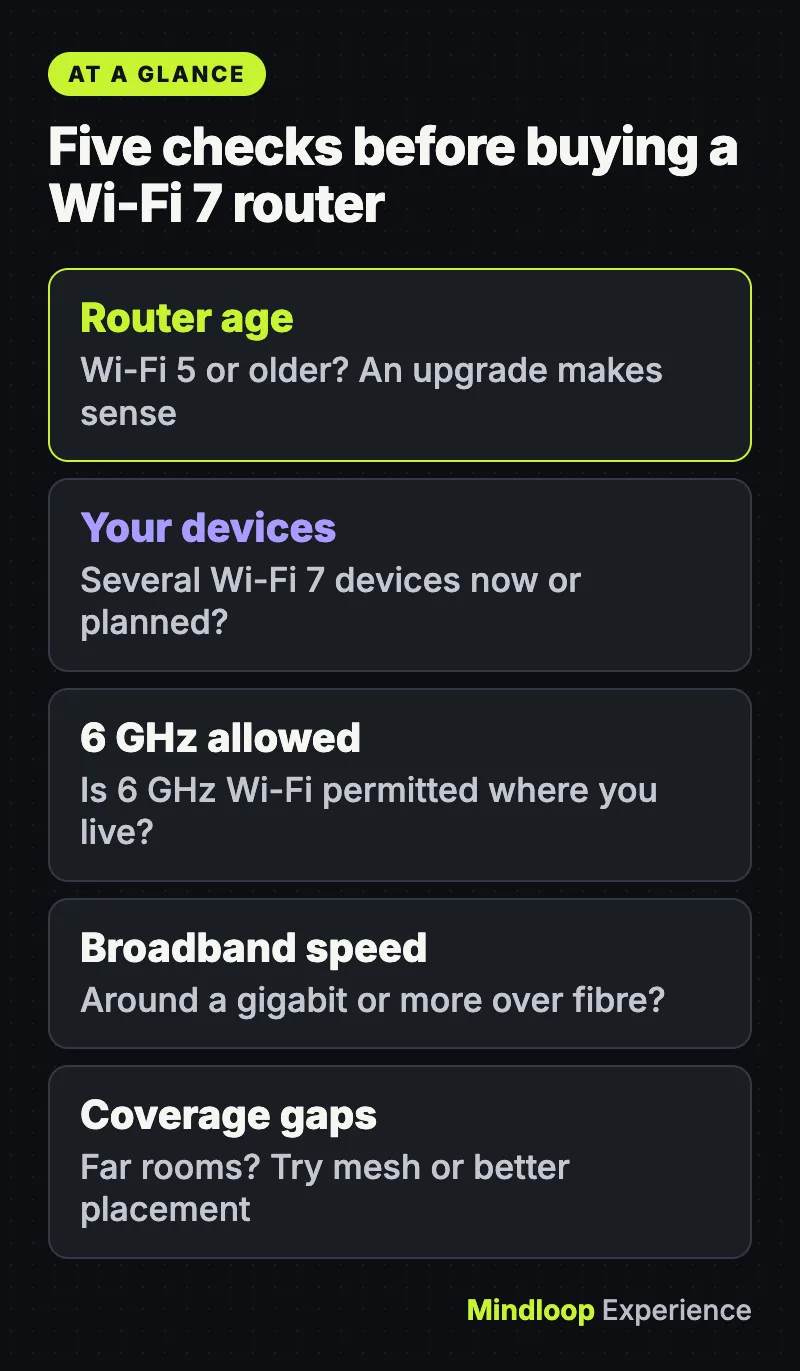
- Your router is Wi-Fi 5 or older, or your provider’s router is several years old and struggling.
- You have, or plan to buy, several Wi-Fi 7 devices, and you live somewhere 6 GHz Wi-Fi is allowed.
- You have a fast fiber connection, around a gigabit or more, and want to use it over Wi-Fi.
- You have a busy household with lots of simultaneous streaming, gaming and video calls, where MLO’s steadier connections help.
- Your router no longer receives firmware updates.
You can probably wait if
- You already have a working Wi-Fi 6 or 6E router and your broadband is a few hundred megabits or less.
- Your problem is coverage in far rooms. A mesh system or better router placement often helps more than a newer standard.
- Most of your devices are older than Wi-Fi 7.
The Wi-Fi Alliance is already describing Wi-Fi 8 as the next generation, focused on reliability rather than peak speed. That is not a reason to put off a router you genuinely need, but it is a reminder that “future-proofing” with the most expensive model has limits.
Frequently asked questions
Yes. Wi-Fi 7 is designed to be backward compatible, and the Wi-Fi Alliance tests certified products for compatibility with earlier generations. Older devices simply connect at their own, lower capability.
If you find a 6E router at a good price, it still gives you access to the 6 GHz band. You miss out on 320 MHz channels and Multi-Link Operation, so for a new purchase at a similar price, Wi-Fi 7 is the more flexible choice.
Only if Wi-Fi is the bottleneck. If your broadband plan is slower than your current Wi-Fi, a new router will not raise your internet speed, though it may improve reliability and speeds between devices at home.
Not always. Signals at 6 GHz don’t travel as far or pass through walls as well as lower bands, so many routers fall back to 5 GHz or 2.4 GHz for distant rooms.
For most people, the best time to buy Wi-Fi 7 is when your current router is genuinely holding you back.
Quick quiz
How wide is Wi-Fi 7’s widest channel?
- 160 MHz
- 320 MHz
- 1,200 MHz
Wi-Fi 7 doubles the widest channel from 160 MHz to 320 MHz, only in the 6 GHz band.
What does Multi-Link Operation let a device do?
- Use several bands at once
- Skip WPA3 security
- Raise your broadband plan speed
With MLO, devices can transmit and receive data over multiple links, such as 5 GHz and 6 GHz together.
What does the Wi-Fi CERTIFIED 7 seal mean?
- The box simply says Wi-Fi 7
- It reaches 30 gigabits per second at home
- It passed interoperability, security and compatibility testing
The Wi-Fi Alliance says the seal means the product passed interoperability, security and backward-compatibility testing.
Sources
Links last checked on 15 November 2026.
- IEEE SA – IEEE 802.11ax-2021
- Wi-Fi Alliance® introduces Wi-Fi 6 | Wi-Fi Alliance
- IEEE SA – IEEE 802.11be-2024
- Wi-Fi Alliance® introduces Wi-Fi CERTIFIED 7™ | Wi-Fi Alliance
- FCC Opens 6 GHz Band to Wi-Fi and Other Unlicensed Uses | Federal Communications Commission
- Wi-Fi Alliance® welcomes FCC action expanding unlicensed use in the 6 GHz band | Wi-Fi Alliance
- Ofcom: Interface Requirement 2030
- The Wireless Telegraphy (Exemption) (Amendment) (No. 3) Regulations 2026 | legislation.gov.uk
- The Wireless Telegraphy (Dynamic Spectrum Access Devices) (Exemption) Regulations 2026 | legislation.gov.uk
- Wi-Fi 7 availability on Apple devices – Apple Support
- Broadband Speed Guide | Federal Communications Commission
- Buying a Wi-Fi 7 router? Here is what matters. | Wi-Fi Alliance




Write a response