Grok 4.7 is the newest and most capable model on the xAI API, and you can call it from a terminal or a short script in a few minutes. This guide walks you through creating a key, sending a first request with curl, Python and JavaScript, then using the features you’ll want next: reasoning effort, follow-up questions, live web search, cost tracking and the newer content guidelines. The commands follow the official docs at docs.x.ai, checked on 15 November 2026.
Key takeaways
- Grok 4.7 is the most capable model on the xAI API, with a 500,000-token context window.
- Create a key at console.x.ai, store it as XAI_API_KEY, and call the Responses API with curl or the OpenAI SDK.
- Set reasoning effort from low to xhigh, continue chats with previous_response_id, and add the web_search tool for current answers.
- Each response reports its exact price in cost_in_usd_ticks, and optional guidelines decline nsfw, violence or profanity.
One naming note: the docs now call the company SpaceXSI, but the service is still “the xAI API”, the address is still api.x.ai and the key variable is still XAI_API_KEY.
What you need
- An account at console.x.ai with credits loaded. The quickstart says to load credits before you use the API.
- A terminal with
curl. That is enough for the whole guide. - Optional: Python with
pip, or Node.js withnpm, if you want to call the API from code.
Grok 4.7 at a glance
These figures are from the Grok 4.7 page and the pricing page as of 15 November 2026. Prices change, so check before you budget.
| Property | Value |
|---|---|
| Model name | grok-4.7 |
| Context window | 500,000 tokens |
| Knowledge cutoff | May 2026 |
| Input | Text and images |
| Output | Text |
| Price, prompts under 200k tokens | $2.00 input, $0.50 cached input, $6.00 output per 1M tokens |
| Price, prompts of 200k tokens or more | $4.00 input, $1.00 cached input, $12.00 output per 1M tokens |
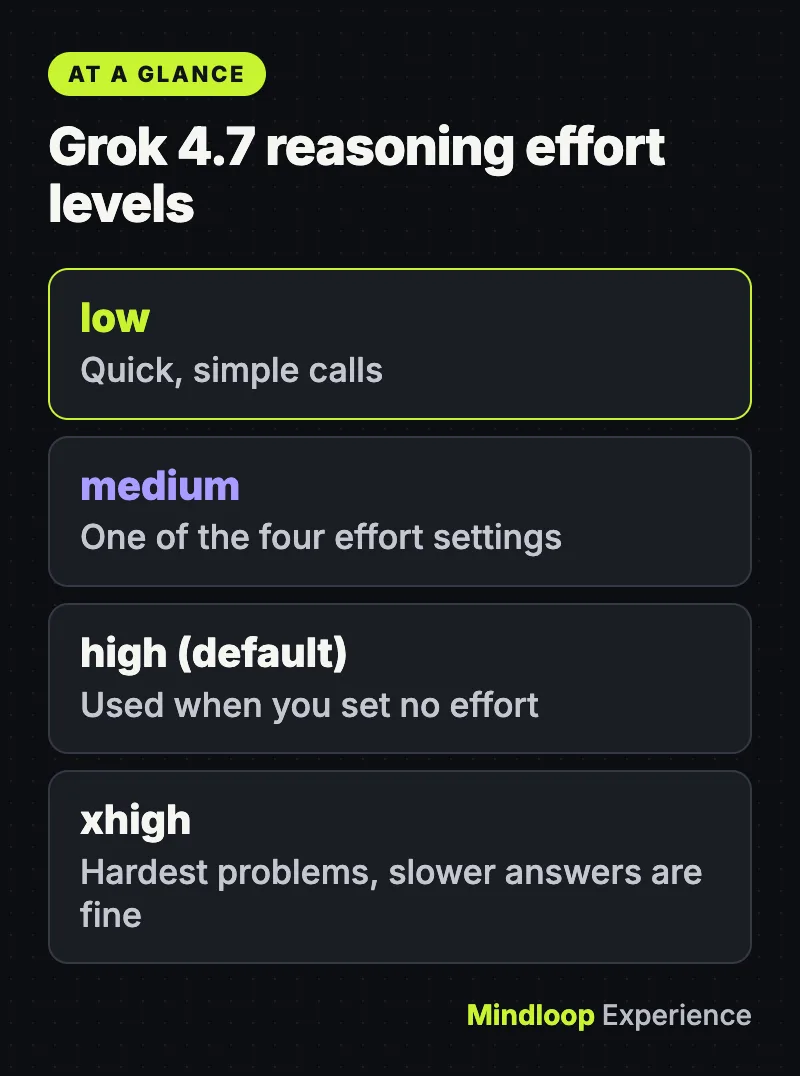
| Reasoning effort | low, medium, high (default) or xhigh |
By the numbers
500,000 tokenscontext window
$2.00input per 1M tokens, under 200k
$6.00output per 1M tokens, under 200k
Step 1: Create an API key
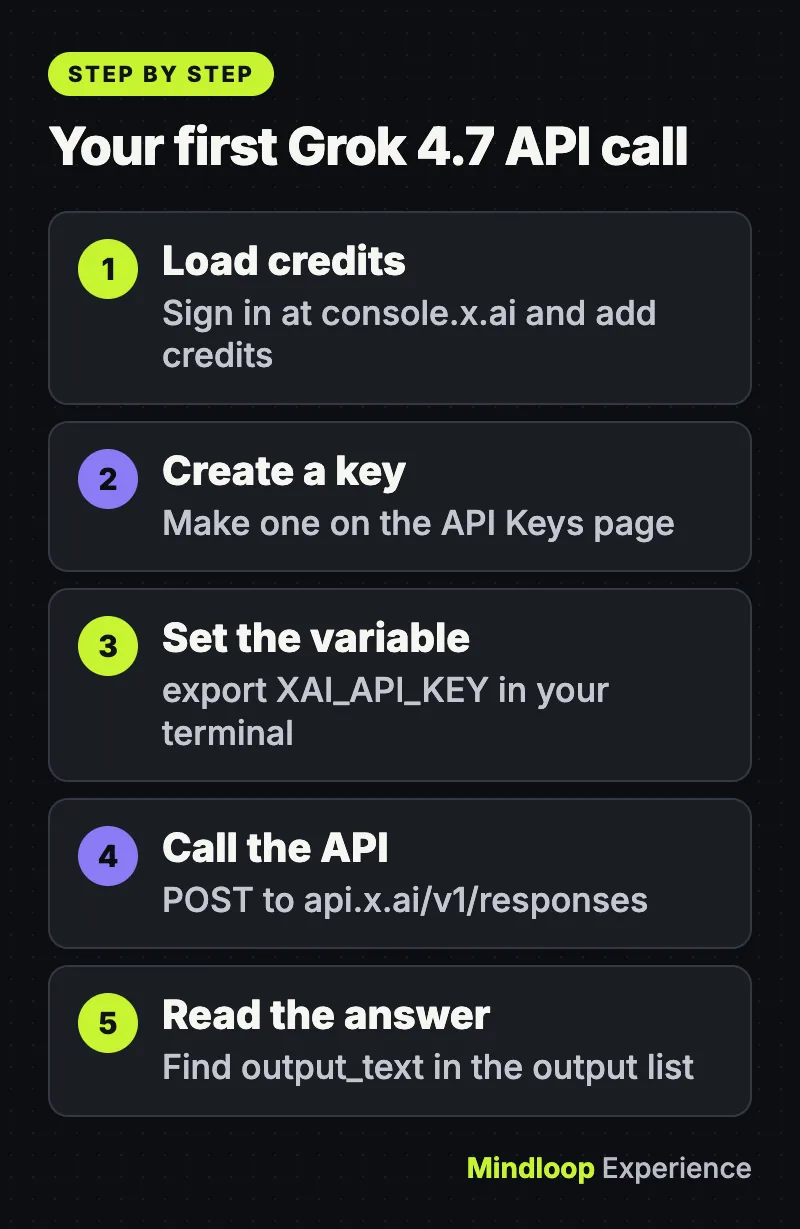
- Sign in at console.x.ai and add credits.
- Open the API Keys page and create a key.
- Store it in an environment variable so it never sits in your code:
export XAI_API_KEY="your_api_key"On Windows PowerShell, use $env:XAI_API_KEY="your_api_key" instead. Treat the key like a password. Don’t paste it into shared documents or commit it to a repository.
Step 2: Send your first request with curl
The docs recommend the Responses API, at https://api.x.ai/v1/responses. This is the quickstart example:
curl https://api.x.ai/v1/responses \
  -H "Authorization: Bearer $XAI_API_KEY" \
  -H "Content-Type: application/json" \
  -d '{
    "model": "grok-4.7",
    "input": "Fix this function and explain the bug: function median(a){a.sort();return a[a.length/2]}"
  }'
Expected result: a JSON object. The answer is inside the output list, in an item of type message whose content has type output_text. The same object has an id (you’ll use it in Step 5) and a usage block with token counts.
Step 3: Call it from Python or JavaScript
The API works with the OpenAI SDKs if you point them at xAI’s base URL. Install one:
pip install openainpm install openaiPython:
import os
from openai import OpenAI

client = OpenAI(
    api_key=os.getenv("XAI_API_KEY"),
    base_url="https://api.x.ai/v1",
)

response = client.responses.create(
    model="grok-4.7",
    input="Fix this function and explain the bug: function median(a){a.sort();return a[a.length/2]}",
)

print(response.output_text)
JavaScript (save it as a .mjs file so import and top-level await work in Node.js):
import OpenAI from 'openai';

const client = new OpenAI({
  apiKey: process.env.XAI_API_KEY,
  baseURL: 'https://api.x.ai/v1',
});

const response = await client.responses.create({
  model: 'grok-4.7',
  input: 'Fix this function and explain the bug: function median(a){a.sort();return a[a.length/2]}',
});

console.log(response.output_text);
Both print only the model’s text. xAI also has its own Python package (pip install xai-sdk), and the docs say it’s fine to mix the two.
Step 4: Choose how hard the model thinks
Grok 4.7 always reasons before it answers. You can’t switch that off, but the reasoning guide lets you set the effort. The default is high. Use low for quick, simple calls and xhigh for the hardest problems, where a slower answer is acceptable.
curl https://api.x.ai/v1/responses \
  -H "Content-Type: application/json" \
  -H "Authorization: Bearer $XAI_API_KEY" \
  -m 3600 \
  -d '{
    "model": "grok-4.7",
    "reasoning": {"effort": "low"},
    "input": "Summarise the difference between TCP and UDP in three bullet points."
  }'
The -m 3600 flag lets the request run for up to an hour before curl gives up. The docs use it in their reasoning examples because deep reasoning can take a while. In Python, the same setting is reasoning={"effort": "low"}.
Step 5: Ask a follow-up without resending the chat
By default the Responses API stores each exchange on xAI’s servers for 30 days, according to the text generation guide. That lets you continue a conversation by passing the earlier response’s id:
curl https://api.x.ai/v1/responses \
  -H "Content-Type: application/json" \
  -H "Authorization: Bearer $XAI_API_KEY" \
  -m 3600 \
  -d '{
    "model": "grok-4.7",
    "previous_response_id": "The previous response ID",
    "input": [
        {
            "role": "user",
            "content": "How do stars form?"
        }
    ]
}'
Replace the placeholder with the id from your earlier response. If you’d rather not have requests stored, add "store": false to the request and keep the history yourself.
Did you know?
By default the Responses API stores each exchange on xAI’s servers for 30 days. Add “store”: false to a request if you would rather keep the conversation history yourself.
Step 6: Let Grok search the web
The models page is blunt about this: without search tools, Grok knows nothing beyond its training data. To get current answers, add the web search tool:
curl https://api.x.ai/v1/responses \
  -H "Content-Type: application/json" \
  -H "Authorization: Bearer $XAI_API_KEY" \
  -d '{
  "model": "grok-4.7",
  "input": [
    {
      "role": "user",
      "content": "What were the main technology headlines this week?"
    }
  ],
  "tools": [
    {
      "type": "web_search"
    }
  ]
}'
Grok decides how many searches to run. As of 15 November 2026 web search costs $5 per 1,000 calls on top of the normal token charges, so a research-heavy prompt costs more than a plain one.
Step 7: See what each request cost
Every response reports its exact price in a field called cost_in_usd_ticks, described in the cost tracking guide. One US dollar is 10,000,000,000 ticks. If you have jq installed, this prints the number for a single call:
curl https://api.x.ai/v1/responses \
  -H "Authorization: Bearer $XAI_API_KEY" \
  -H "Content-Type: application/json" \
  -d '{
    "model": "grok-4.7",
    "input": "Say hello"
  }' | jq '.usage.cost_in_usd_ticks'
Divide the result by 10,000,000,000 to get dollars. The docs’ own example: 37756000 ticks is about $0.0038.
Did you know?
xAI prices requests in ticks: one US dollar is 10,000,000,000 ticks. The docs’ own example of 37756000 ticks works out to about $0.0038.
Step 8 (optional): Add content guidelines
In October 2026 xAI added custom moderation controls. You attach a guidelines list to a request, and Grok declines that kind of content while it writes. There are three categories, nsfw, violence and profanity, and the only behavior today is decline.
curl https://api.x.ai/v1/responses \
  -H "Authorization: Bearer $XAI_API_KEY" \
  -H "Content-Type: application/json" \
  -d '{
    "model": "grok-4.7",
    "input": "Write a short story about a knight.",
    "guidelines": [
      { "type": "policy", "category": "violence", "behavior": "decline" },
      { "type": "policy", "category": "nsfw", "behavior": "decline" }
    ]
  }'
Guidelines apply only to the request that carries them, so send them every time. With the OpenAI Python SDK, pass the list inside extra_body, because that SDK has no guidelines parameter of its own.
Common errors and fixes
The status codes below come from xAI’s debugging page and the guides linked above.
| What you see | Likely cause | Fix |
|---|---|---|
401 Unauthorized | No authorization header, or an invalid key | Send Authorization: Bearer <your key>, and check the variable is set with echo $XAI_API_KEY |
400 Bad Request | An invalid argument in the body or URL, or an incorrect API key | Check the JSON, the endpoint address and the key |
403 Forbidden | Your key or team doesn’t have permission, or is blocked | Ask your team admin for permission |
404 Not Found | The model in the request wasn’t found, or the URL is misspelled | Check the spelling grok-4.7 and the endpoint address |
415 Unsupported Media Type | Empty body, or the Content-Type: application/json header is missing | Add the header and a valid body |
422 Unprocessable Entity | A field has an invalid format, for example an unknown guidelines category | Check the field against the docs. For guidelines, the error lists the valid values |
429 Too Many Requests | You hit a rate limit | Slow down and retry with a growing delay. Limits rise automatically with your team’s total spend |
Error when you set stop, a presence penalty or a frequency penalty | Reasoning models don’t accept these | Remove them |
| The request times out | Reasoning took longer than your client allows | Raise your client’s timeout (the docs’ examples use 3,600 seconds) or lower the reasoning effort |
If everything fails at once, look at status.x.ai before you debug your own code.
Wrap-up
You now have a working key, a first request, and five settings most projects need: reasoning effort, stored conversations, web search, per-request cost and content guidelines. The docs also cover streaming, structured outputs, file uploads and function calling.
If you’re comparing providers, our Gemini 4 Hydrogen API guide follows the same steps for Google’s model. If you’d rather keep everything on your own machine, see how to run a model locally with Ollama. And if you want Grok in your calls instead of your code, here is how to add Grok to Zoom, Google Meet or Teams.
Frequently asked questions
How much does the Grok 4.7 API cost?
For prompts under 200k tokens, $2.00 input, $0.50 cached input and $6.00 output per 1M tokens. Prompts of 200k tokens or more cost double. Web search adds $5 per 1,000 calls. Prices are as of 15 November 2026.
Can I use the OpenAI SDK with the Grok API?
Yes. Point the OpenAI Python or JavaScript SDK at the base URL https://api.x.ai/v1 with your XAI_API_KEY and call responses.create with model grok-4.7. xAI also has its own xai-sdk package, and the docs say mixing them is fine.
Why does my Grok API request time out?
Grok 4.7 always reasons before answering, and deep reasoning can take a while. Raise your client’s timeout (the docs’ examples use 3,600 seconds) or lower the reasoning effort.
Can Grok 4.7 turn off reasoning?
No. Grok 4.7 always reasons before it answers. You can only set the effort to low, medium, high or xhigh, and high is the default.
Quick quiz
What is Grok 4.7’s default reasoning effort?
- low
- medium
- high
The reasoning guide sets high as the default.
How many ticks make one US dollar?
- 10,000,000,000
- 1,000,000
- 37,756,000
The cost tracking guide says one US dollar is 10,000,000,000 ticks.
What does a 401 Unauthorized error usually mean?
- You hit a rate limit
- A missing header or invalid key
- The model name is misspelled
xAI’s debugging page lists no authorization header or an invalid key as the cause.
Sources
Links last checked on 15 November 2026.


Write a response