A text says a parcel is stuck at the depot and needs a $1.45 redelivery fee. An email from “your bank” says a new device has signed in and you must confirm your details within 24 hours. A caller claiming to be from the fraud team knows your name and the last four digits of your card. All three are classic phishing, and all three work because they arrive at a busy moment and ask for one quick action.
Key takeaways
- Phishing was the most common online crime complaint to the FBI in 2025, with 191,561 phishing and spoofing complaints.
- With AI writing flawless messages, look for pressure instead: authority, urgency, emotion, scarcity and current events.
- Preview a link and read the real domain, or skip the message and contact the company another way.
- In the UK forward scam emails to report@phishing.gov.uk and texts to 7726; in the US use ReportFraud.ftc.gov and ic3.gov.
Scams follow patterns, and the patterns hold whether the bait comes by email, text or phone. Here are the warning signs that still matter now that scam messages are often flawlessly written, how to check a link without clicking, what to do if you did click, and where to report it in the UK and US.
How big the problem is
Phishing is the most common complaint the FBI receives about online crime. Its 2025 Internet Crime Report logged 191,561 phishing and spoofing complaints, more than any other crime type. Reported losses in that category reached about $215.8 million in 2025, roughly three times the 2024 figure. Across all crime types, the FBI’s Internet Crime Complaint Center received 1,008,597 complaints and recorded $20.877 billion in losses.
The Federal Trade Commission sees the same picture from the consumer side. In testimony to Congress in March 2026, it said it received 3 million fraud reports in 2025, with $15.9 billion in reported losses, up from 2.6 million reports and over $12 billion the year before. Imposter scams, where someone pretends to be a bank, company or government agency, were the most reported type of fraud, with more than 1 million reports.
In the UK, the National Cyber Security Centre (NCSC) runs a reporting service for scam emails and websites. As of October 2026 it had received more than 60.5 million reports, leading to 267,300 scams being taken down across 472,300 web addresses. Businesses are targets too: the government’s Cyber Security Breaches Survey 2025/2026, published in April 2026, found phishing was by far the most common attack, experienced by 38% of UK businesses in the previous year.
By the numbers
191,561FBI phishing and spoofing complaints
1,008,597FBI complaints, all crime types
38%UK businesses hit by phishing
Three ways the bait arrives
The FBI defines phishing as unsolicited emails, texts and calls pretending to come from a legitimate company to get personal, financial or login details.
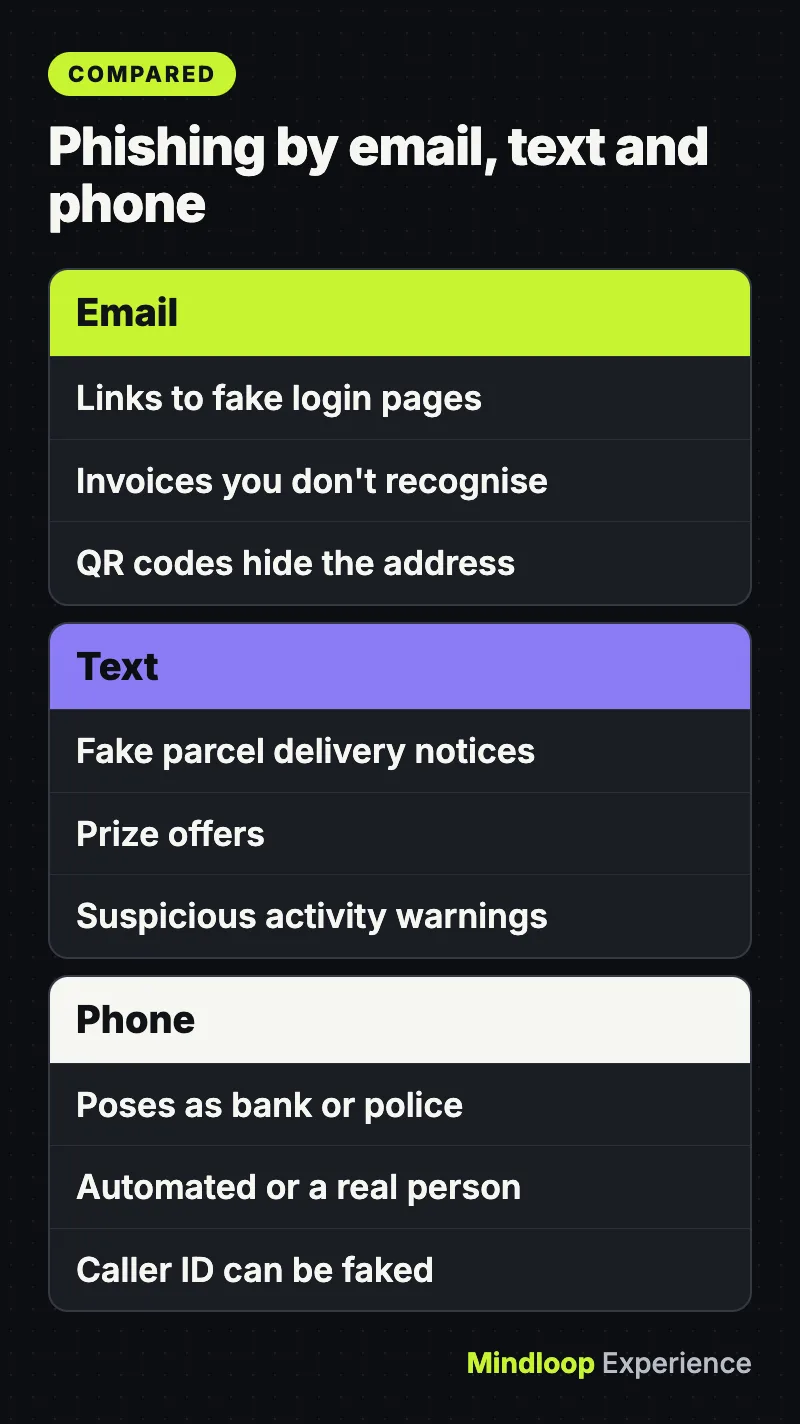
Email phishing usually wants you to click a link to a fake login page or open an attachment. The FTC lists the stories scammers commonly tell: they claim there’s a problem with your account or payment information, say they’ve spotted suspicious log-in attempts, attach an invoice you don’t recognize, or offer a refund or free coupon.
The NCSC also warns that criminals increasingly put QR codes inside phishing emails. A code hides the web address until you scan it, usually on a phone where the address is harder to inspect.
Text messages (smishing)
The FTC’s examples of scam texts include fake package delivery notifications, unrecognized invoices, prize offers and warnings about suspicious activity on your account.
Phone calls (vishing)
Phone scammers call unexpectedly while pretending to be from an organization you trust, such as your bank or the police, according to the NCSC. The call may be automated or a real person, and the goal is usually to get banking details or persuade you to move money. Caller ID can be faked, so a familiar number on screen proves nothing.
The red flags that still work
Bad spelling used to be the giveaway. The US Cybersecurity and Infrastructure Security Agency (CISA) now points out that, in the era of artificial intelligence, some emails will now have perfect grammar and spelling, so you need to look for other signs. The most reliable ones are about pressure, not presentation.
The NCSC groups the tell-tale signs like this:
- Authority. The message claims to come from someone official: your bank, a doctor, a solicitor or a government department.
- Urgency. You have “24 hours” or must act “immediately”, often with a threatened fine or account closure.
- Emotion. The wording is designed to make you panic, feel hopeful or get curious.
- Scarcity. It offers something in short supply, such as tickets, money or a cure.
- Current events. It piggybacks on the news or the time of year, such as tax deadlines.
CISA adds three more practical checks: requests to send personal or financial information, untrusted shortened links, and addresses or links that are almost right, like “amaz a n.com”.
One rule cuts through most of it. The NCSC says your bank, or any other official source, will never ask you to supply personal information by email or call to ask you to confirm your bank account details. The FTC says legitimate companies won’t email or text with a link to update your payment information.
Did you know?
Bad spelling is no longer a reliable giveaway. CISA warns that in the era of artificial intelligence some phishing emails have perfect grammar and spelling, so watch for pressure instead.
How to check a link or sender without clicking
Read the sender’s real address
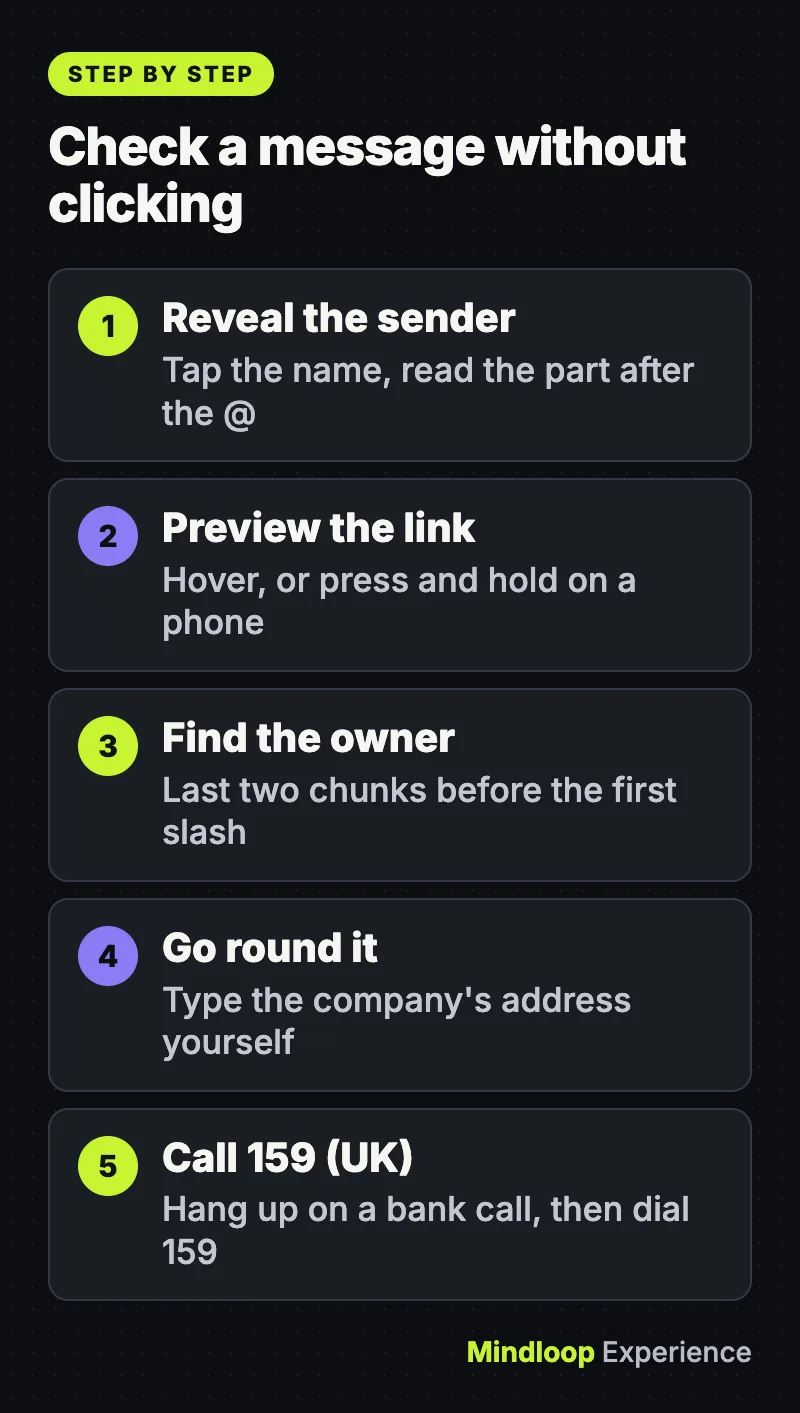
Your email app shows a display name, which anyone can set to “PayPal Support” or “HMRC”. Tap or click the name to reveal the actual address behind it. What matters is the part after the @ sign. A message from a big company sent from a free webmail account, or from a domain with extra words bolted on, is a strong warning.
Find the real domain in a link
On a computer, hover over a link and the true destination appears at the bottom of the browser window. On a phone, press and hold the link to preview it without opening it.
Then read the domain properly. The part that matters sits just before the first single forward slash, and it is the last two chunks that tell you who owns it. In paypal.com.account-check.example/login, the owner is account-check.example, not PayPal. In login.yourbank.co.uk/help, the owner is yourbank.co.uk, because .co.uk works as a single ending. Scammers rely on people reading from left to right and stopping as soon as they see a familiar name.
Go round the message, not through it
The safest check skips the message completely. If you think a message might be genuine, CISA advises looking up another way to contact the company or person: type the website address yourself or use a search engine, and if a friend sends something odd, call or text them on a number you already have.
For calls about money in the UK, hang up and dial 159. Stop Scams UK, the industry body that runs it, says the number connects customers of more than 99% of UK retail bank current accounts directly with their bank and cannot be spoofed. Otherwise, use the number on the back of your card.
If you already clicked
Don’t let embarrassment slow you down; speed matters most. The NCSC’s guidance on what to do if you’ve shared sensitive information boils down to these steps:
- Gave bank or card details? Call your bank straight away using the number on your card or official website.
- Typed in a password? Change it on that account and on any other account that uses the same password. The NCSC suggests switching to a passkey where one is available.
- Opened an attachment or installed something? Run a full scan with your antivirus software and let it remove what it finds. The FTC gives the same advice: update your security software, then run a scan.
- Was it a work device? Tell your IT team now.
- Lost money? Tell your bank and report it as a crime (see below).
In the US, if a scammer may have your Social Security, credit card or bank account number, the FTC points victims to IdentityTheft.gov for a step-by-step recovery plan. It is also worth checking which old accounts still use your username.
Where to report it
In the UK
- Scam emails: forward them to report@phishing.gov.uk. The NCSC says you can send emails that feel suspicious even if you’re not sure, and there is no need to forward ones already sitting in your spam folder.
- Scam texts: forward them free to 7726, which most UK phone providers support, so your network can investigate and block the sender.
- If you lost money or were hacked: in England, Wales and Northern Ireland, report to Report Fraud online or on 0300 123 2040. In Scotland, call Police Scotland on 101.
In the US
- Scam texts: forward them to 7726 (SPAM), report them in your messaging app, and report them to the FTC at ReportFraud.ftc.gov.
- Scam emails: use your email app’s report button, as CISA recommends, and forward the message to the Anti-Phishing Working Group at reportphishing@apwg.org. APWG asks you to use “Forward as attachment” if your app supports it, because it gives APWG more detail to trace the scam site.
- Online crime with losses: file a complaint with the FBI’s Internet Crime Complaint Center at ic3.gov.
Recognize and Report Phishing (YouTube)
Make yourself a harder target
Turn on two-step verification, then move to passkeys
The FTC recommends multi-factor authentication, which asks for a second proof such as a one-time code or a fingerprint, so a stolen password alone is not enough to get in. Not every method is equal, though: CISA points people toward phishing-resistant MFA as the strongest option. A one-time code typed into a convincing fake page can be passed straight on to a criminal.
Passkeys close that gap. In April 2026 the NCSC said it would no longer recommend individuals use passwords where passkeys are available, describing them as highly resistant to phishing. Its technical report found passkeys at least as secure as, and generally more secure than, the strongest password paired with two-step verification. Built on the FIDO2 standard, passkeys can’t be intercepted, reused or stolen like passwords, and you approve each login with your face, fingerprint or device PIN. Look for “passkey” in your accounts’ security settings.
Keep devices updated and say less online
The FTC advises setting your phone and computer to update automatically. Browsers matter as much as anything, as our explainer on Chrome zero-days and how to check you’re patched shows. The NCSC also notes that criminals use what you post on social media to make their messages more convincing, so a quick privacy-settings review pays off.
Did you know?
In April 2026 the NCSC said it would no longer recommend individuals use passwords where passkeys are available, describing passkeys as highly resistant to phishing.
Frequently asked questions
Opening the message is rarely the problem. The danger comes from clicking links, opening attachments, scanning QR codes or replying, so if you have only read it, report it and delete it.
No. CISA advises deleting suspicious messages without clicking anything, including any unsubscribe link. In a scam email, that link is just another link controlled by the sender.
Not necessarily. Sender details can be faked, so judge the request, not the name. If it asks you to click, pay or confirm details, contact the organization through its official website or app instead.
Scammers often have scraps of real information from breaches or social media. Knowing your name or part of a card number proves nothing, so hang up and call back on a number you trust.
When something feels urgent, slow down. A real bank will still be there in ten minutes.
Quick quiz
Which number can UK customers dial to reach their own bank after a suspicious call?
- 101
- 7726
- 159
Stop Scams UK says 159 connects customers of more than 99% of UK retail bank current accounts directly with their bank.
In paypal.com.account-check.example/login, who owns the domain?
- PayPal
- account-check.example
- login
The last two chunks before the first single slash show the owner, here account-check.example.
Why does the NCSC now favor passkeys over passwords?
- They are highly resistant to phishing
- They never need a device
- They skip any login check
The NCSC describes passkeys as highly resistant to phishing because they can’t be intercepted, reused or stolen like passwords.
Sources
Links last checked on 15 November 2026.
- FBI Internet Crime Complaint Center: 2025 Internet Crime Report
- FTC Testifies before the Joint Economic Committee on Agency’s Efforts to Combat Fraud | Federal Trade Commission
- Phishing scams: how to spot and report them | National Cyber Security Centre
- Cyber security breaches survey 2025/2026 – GOV.UK
- How To Recognize and Avoid Phishing Scams | Consumer Advice
- Phishing scams: how to spot and report them | How to spot a scam email, text message or call | National Cyber Security Centre
- How to Recognize and Report Spam Text Messages | Consumer Advice
- Phishing scams: how to spot and report them | Report a scam phone call | National Cyber Security Centre
- Recognize and Report Phishing | CISA
- 159 Phone number – Stop Scams UK
- Phishing scams: how to spot and report them | Phishing scams: If you’ve shared sensitive information | National Cyber Security Centre
- Phishing scams: how to spot and report them | Report a scam email | National Cyber Security Centre


Write a response