Google released Gemini 4 Neon on November 18, 2026: a middle model that Google places between Hydrogen and Carbon, with a lower cost per task than Carbon by Google’s own measure, yet a higher per-token price than Carbon until November 30. Here’s where you can use it, how to make your first API call in Python, JavaScript or curl, which thinking level to pick, what an agent run costs, and the errors you’ll hit when you switch an app over. Every price, limit and code sample comes from Google’s own docs, as checked on November 20, 2026.
Key takeaways
- Gemini 4 Neon sits between Hydrogen and Carbon and costs $3.00 input and $15.00 output per 1M tokens.
- Neon is paid tier only in the API; Pro and Ultra subscribers can pick it in the Gemini app.
- It defaults to the high thinking level, adds xhigh and rejects minimal; pick the lowest level that passes your tests.
- Until November 30 Carbon is cheaper per token; from December 1 Carbon doubles to $4.00 and $20.00.
What’s new: Gemini 4 Neon in one minute
Neon (model ID gemini-4-neon) is Google’s new middle model in the Gemini 4 family. According to the What’s new in Gemini 4 Neon page, it “sits between Gemini 4 Hydrogen and Gemini 4 Carbon for high-frequency complex tasks” such as multi-file refactoring, dense documents and science workflows. The model card says Neon is adapted from Gemini 4 Carbon and has a knowledge cutoff of March 2026.
The basics from the Gemini 4 Neon model page:
- Inputs: text, image, video, audio and PDF. Output: text only (no image or audio generation, no Live API).
- Context: one unified window of 1,048,576 tokens shared by input, thinking and output.
- Max output: 65,536 tokens per synchronous response by default, up to 1,048,576 with long decode.
- Tools: function calling, structured outputs, code execution, computer use, Search and Maps grounding.
- Caching: implicit caching only. Explicit caching is not supported.
Google’s announcement quotes these results (Google’s own figures): a score of 61 on the Artificial Analysis Intelligence Index at the xhigh thinking level (#3 overall), 65.2% on Terminal-Bench 4.1, and 70.9% on the Vals Index. The model card’s own table shows Claude Opus 5.5 slightly ahead on Terminal-Bench 4.1 (65.8%). Google also says that at the default high level, Neon has “a 32% lower cost per task than Carbon.” That’s a per-task claim from using fewer tokens, not a lower per-token price.
By the numbers
1,048,576token unified context window
65,536default max output tokens
$3.00per 1M input tokens
Where you can use Gemini 4 Neon
According to Google’s announcement, Neon is rolling out here:
| Where | Who gets it | How you pick it |
|---|---|---|
| Gemini API (Google AI Studio) | Developers on the paid tier only | model: "gemini-4-neon" |
| Gemini app | Google AI Pro and Ultra subscribers | Model drop-down |
| Google AI Studio | Google AI Pro and Ultra subscribers | Not specified in the announcement |
| Google Antigravity | Paid Google AI Pro and Ultra subscribers | Not specified in the announcement |
| Gemini for business | Business customers | API or model drop-down |
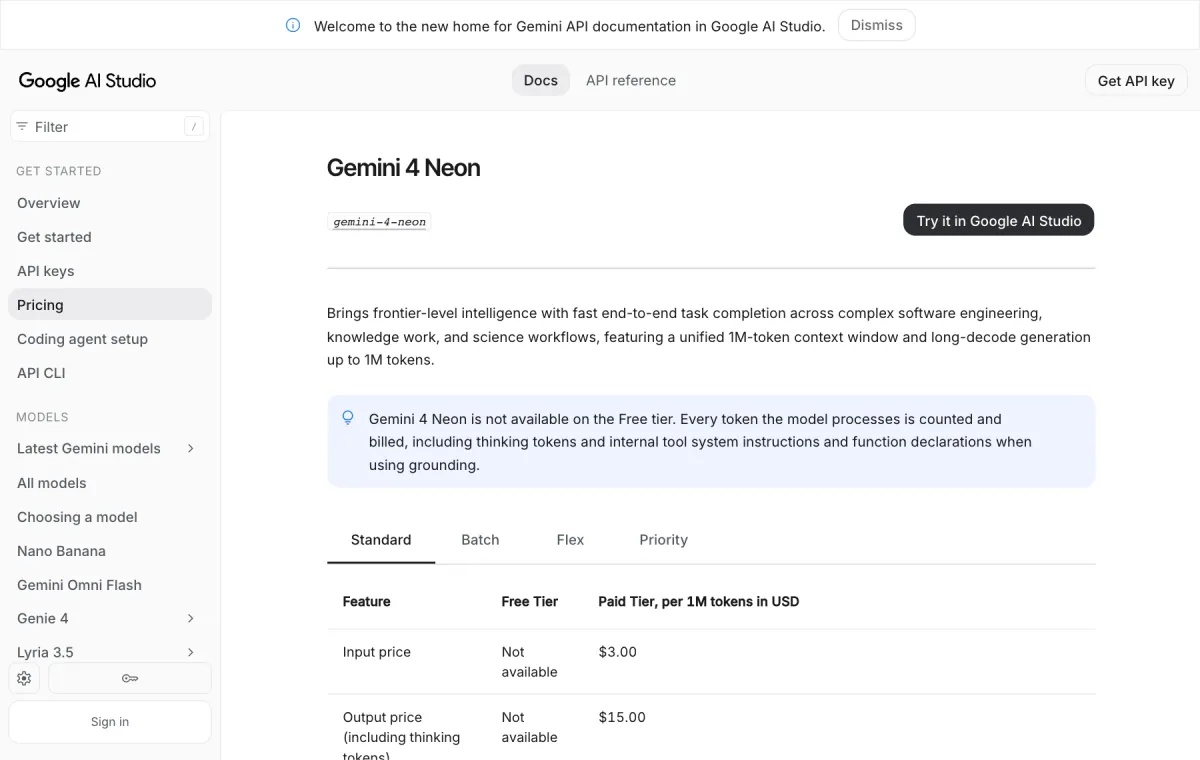
The API has no free tier for Neon: the pricing page marks every Neon free-tier price “Not available,” as for Carbon. Hydrogen is the Gemini 4 model you can still try free. Google’s announcement doesn’t list countries, so in the US, the UK or the Gulf, check the Gemini app’s model drop-down on a Pro or Ultra plan, or make a test call from a paid AI Studio project. For what those plans cost in the UAE, see our guide to ChatGPT and Gemini plans and AED prices in the UAE.
What you need
- A Google account with access to Google AI Studio.
- A Google Cloud billing account linked to your AI Studio project. Google’s billing guide says moving to the paid tier means linking a billing account and prepaying a minimum of $5 in credits on the Prepay plan (some accounts are offered or assigned Postpay instead).
- Python with
pip, or Node.js withnpm, or justcurl.
How to set up the Gemini 4 Neon API, step by step
- Get an API key. Open the AI Studio API keys page. Google creates a project and key automatically for new users; otherwise click Create API key and follow the dialog to add a key-project pair.
- Turn on billing for that project. On the same API keys page (or the Projects page), find the project and click Set up billing under the Billing Tier column. New billing users pick a country, accept the terms and add a payment method; existing users choose a billing account. Then prepay the $5 minimum if asked.
- Store the key as an environment variable. The SDKs pick up
GEMINI_API_KEYautomatically. On macOS or Linux:
export GEMINI_API_KEY="YOUR_API_KEY"- Install the SDK. These are the official Google GenAI libraries:
pip install -U google-genainpm install @google/genai- Send your first request with the Interactions API. Python, from the Neon docs:
from google import genai

client = genai.Client()

interaction = client.interactions.create(
    model="gemini-4-neon",
    input="Build an interactive single-file HTML token bucket rate-limiter simulator with live sliders for burst size and request traffic."
)

print(interaction.output_text)
The JavaScript version:
import { GoogleGenAI } from "@google/genai";

const client = new GoogleGenAI({});

const interaction = await client.interactions.create({
  model: "gemini-4-neon",
  input: "Build an interactive single-file HTML token bucket rate-limiter simulator with live sliders for burst size and request traffic.",
});

console.log(interaction.output_text);
And the REST call with curl:
curl "https://generativelanguage.googleapis.com/v1beta/interactions" \
  -H "x-goog-api-key: $GEMINI_API_KEY" \
  -H 'Content-Type: application/json' \
  -X POST \
  -d '{
    "model": "gemini-4-neon",
    "input": "Build an interactive single-file HTML token bucket rate-limiter simulator with live sliders for burst size and request traffic."
}'- Watch your spend. Usage appears in AI Studio under Dashboard > Usage, and Google’s API key guide recommends setting billing alerts in the Google Cloud console.
Switching from another Gemini 4 model “requires no request schema changes” beyond the model ID, thinking level and a paid project, per Google’s migration checklist. Our Gemini 4 Hydrogen API guide covers the shared setup in more depth.

Gemini 4 Neon thinking levels: which one to use
The thinking level is your main lever on quality, latency and cost. Neon supports low, medium, high (default) and xhigh, but not minimal, which Gemini 3.5 Flash-Lite and some older models use. Google’s docs describe them like this:
| Level | Token use | Good for |
|---|---|---|
low | Fewest tokens, lowest latency | Fast chat, high-throughput processing; still capable on agentic tasks |
medium | Lower token use, faster responses | Interactive coding, live UI prototyping, responsive chat, quick tool calls |
high (default) | Balanced | Most tasks: complex coding, agents, tool calling, multimodal knowledge work |
xhigh | Most tokens, deepest reasoning | Hard multi-step engineering, analytical and science problems where high falls short |
Set it through generation_config. This is Google’s own xhigh example in Python:
from google import genai

client = genai.Client()

interaction = client.interactions.create(
    model="gemini-4-neon",
    input="Audit this payment retry queue for race conditions and rewrite the lock acquisition logic.",
    generation_config={
        "thinking_level": "xhigh"
    }
)

print(interaction.output_text)
In REST, the same field goes in the JSON body as "generation_config": {"thinking_level": "xhigh"}. Google’s advice: run your evaluations at all four levels with a high max_output_tokens, then pick the lowest level that meets your quality bar. Thinking tokens are billed as output tokens, so dropping from high to medium is often a cheaper fix than switching models. The thinking guide has more.
Did you know?
Thinking tokens are billed as output tokens on Neon, so dropping from the high to the medium thinking level is often a cheaper fix than switching to a smaller model.
Neon vs Hydrogen vs Carbon: price table and when to pick each
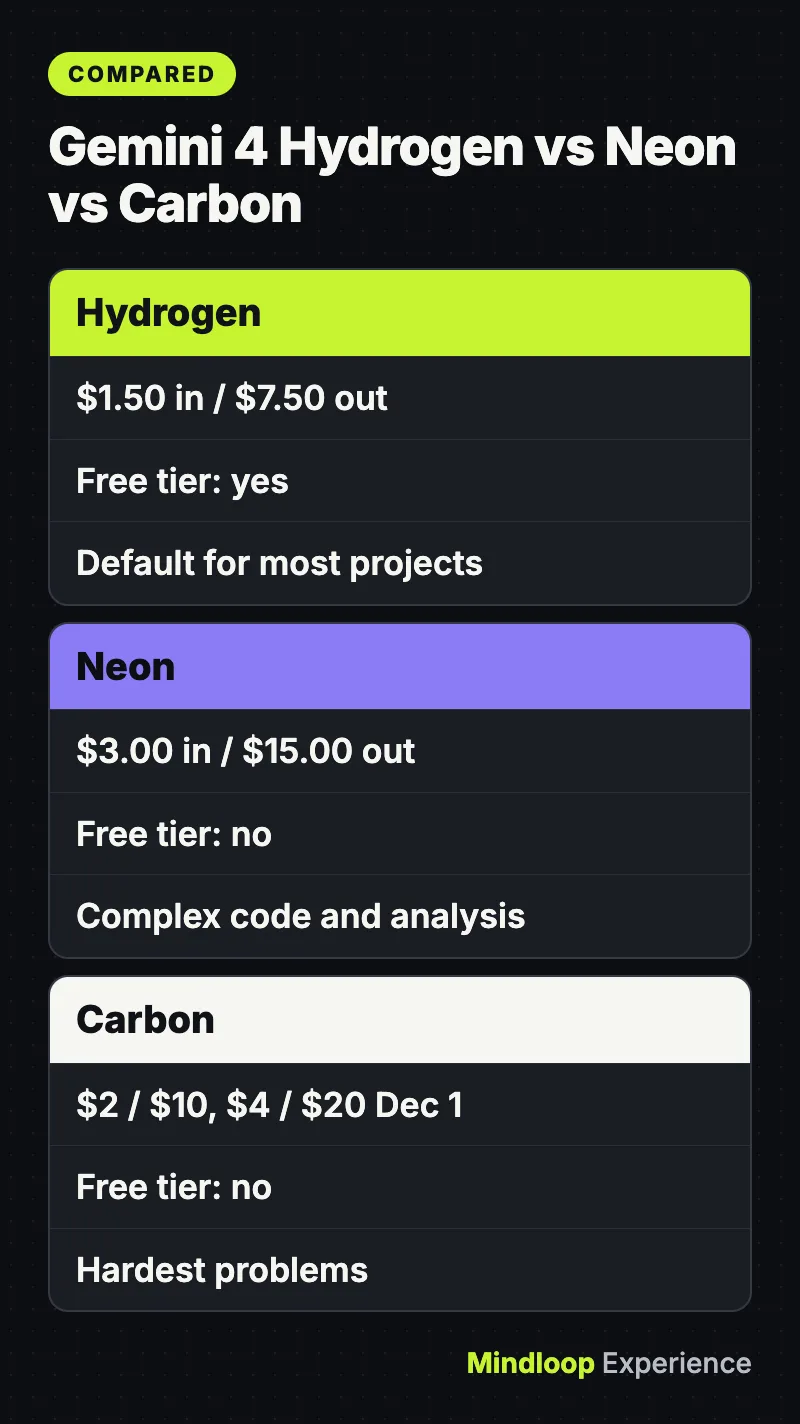
Standard paid-tier prices per 1 million tokens, from Google’s pricing page as of November 20, 2026. Output prices include thinking tokens.
| Model | Input | Output | Cached input | Batch / Flex (in / out) | Free tier |
|---|---|---|---|---|---|
| Gemini 4 Hydrogen | $1.50 | $7.50 | $0.075 | $0.75 / $3.75 | Yes |
| Gemini 4 Neon | $3.00 | $15.00 | $0.15 | $1.50 / $7.50 | No |
| Gemini 4 Carbon, through Nov 30, 2026 | $2.00 | $10.00 | $0.10 | $1.00 / $5.00 | No |
| Gemini 4 Carbon, from Dec 1, 2026 | $4.00 | $20.00 | $0.20 | $2.00 / $10.00 | No |
Gemini 4 Argon has the same prices as Carbon. Neon’s Priority tier costs $5.40 input and $27.00 output. Neon’s price is flat across the 1M window, and Google’s Choosing a model page notes that “Neon has no introductory price.” So until November 30 Carbon is cheaper per token; from December 1 Carbon doubles and Neon becomes the cheaper of the two.
Google’s own guidance on choosing:
- Hydrogen: the default for most new projects, everyday coding and parallel worker agents, at half Neon’s price.
- Neon: complex software engineering, dense knowledge work and science workflows “where Hydrogen isn’t enough and you don’t need Carbon’s extra verification.” Google also lists it as the upgrade for
gemini-3.1-pro-preview. - Carbon: your hardest problems, such as system architecture, formal proofs and security audits, spending more thinking tokens per turn. See our post on Gemini 4 Carbon topping MathArena.
The three share one request schema, so you can pass previous_interaction_id to hand a conversation from one model to another, for example Carbon to plan and Hydrogen to write the code.
Worked cost example: one agent run at high vs Batch
Say an agent run sends 200,000 input tokens (a code repository plus instructions) and gets back 20,000 output tokens, counting thinking. At Google’s list prices (real token counts depend on the task and thinking level):
- Neon, Standard: 0.2M × $3.00 = $0.60 input, plus 0.02M × $15.00 = $0.30 output. Total $0.90.
- Neon, Batch or Flex: 0.2M × $1.50 = $0.30, plus 0.02M × $7.50 = $0.15. Total $0.45.
- Neon, Priority: 0.2M × $5.40 = $1.08, plus 0.02M × $27.00 = $0.54. Total $1.62.
- Neon, Standard, with 150,000 of the input tokens hitting the implicit cache: 0.15M × $0.15 = $0.0225, plus 0.05M × $3.00 = $0.15, plus $0.30 output. Total about $0.47.
- Hydrogen, Standard: $0.30 + $0.15 = $0.45.
- Carbon, Standard: $0.40 + $0.20 = $0.60 through November 30, or $0.80 + $0.40 = $1.20 from December 1.
At 1,000 runs, that’s $900 for Neon on Standard versus $450 on Batch. Implicit caching kicks in on prompts of at least 4,096 tokens and takes 95% off cached input, so put shared instructions, tool definitions and reference files first. A model that needs fewer tokens for the same task, Google’s claim for Neon against Carbon, costs less per finished task than this math shows.
New paid accounts also have spend limits. The rate limits page lists a spend rate limit of $10 per 10 minutes for Tier 1 (whether it applies depends on your account), which is about 11 of the Standard runs above. The billing guide sets a $250 monthly cap for Tier 1.
Did you know?
Implicit caching runs automatically on prompts of at least 4,096 tokens and takes 95% off cached input, cutting cached Neon input to $0.15 per million tokens.
Common errors and fixes
- Neon doesn’t work on your free-tier key. It isn’t offered on the free tier. Click Set up billing on the API keys or Projects page. If the project shows “Set up Prepay” or “No credits,” finish Prepay setup or add credits. The billing guide says the API only serves paid-tier requests while your Prepay balance is positive.
thinking_level: "minimal"fails. Neon rejectsminimalwith an error. Uselowinstead.- Explicit caching code breaks. Neon doesn’t support explicit caching (
cachedContentsandcaches.create). Removecached_contentfields and rely on implicit caching. 400validation errors after migrating. Removetemperature,top_pandtop_k. The server ignores in-range values, but out-of-range values return a400error.- Answers stop early.
max_output_tokenscaps thinking and output combined. Remove old low caps such as 8,192, or raise the cap to 65,536. For longer output, setbackgroundtotrueandmax_output_tokensabove 65,536 (for example 131,072 or 262,144). Withbackground: truebut nomax_output_tokens, the server stops after 65,536 tokens. See Google’s long decode guide. MALFORMED_FUNCTION_CALL. This can happen when a system prompt asks for raw JSON tool calls with no declared tools. Declare tools with function calling, or use structured outputs. If your code only needs a yes/no or a score, our Gemini Decisions API quickstart shows a cheaper route.429 RESOURCE_EXHAUSTED. One documented cause is the spend rate limit. Wait and retry, or send smaller contexts.- Requests time out. Google says hard prompts can take several minutes. Use background execution, or set HTTP client timeouts to at least 15 minutes.
Wrap-up
Use Neon when Hydrogen falls short on multi-file code, long documents or analysis and you don’t need Carbon’s extra thinking. Start at high, test medium, keep xhigh for the hardest jobs, and send non-urgent work through Batch or Flex for half price. To just try it, the Gemini app on a Pro or Ultra plan is quickest, since the API needs billing from the first call. Hydrogen is still the free starting point, and Google has brought it to Search too, as covered in Google Search’s Gemini 4 Hydrogen upgrade. More guides like this are in our AI Guides section.
Frequently asked questions
Is Gemini 4 Neon free to use?
Not in the API. Google’s pricing page lists every Neon free-tier price as not available, so you need a paid AI Studio project with billing linked. Google AI Pro and Ultra subscribers can select Neon in the Gemini app, and Hydrogen still has a free tier.
What is the model ID for Gemini 4 Neon?
The model ID is gemini-4-neon. Google’s migration checklist says switching from another Gemini 4 model needs no request schema changes beyond the model ID, the thinking level and a paid project.
Is Gemini 4 Neon cheaper than Gemini 4 Carbon?
Not per token through November 30, 2026: Carbon is $2.00 and $10.00 per million tokens then, against Neon’s $3.00 and $15.00. From December 1 Carbon rises to $4.00 and $20.00. Google also says Neon has a 32% lower cost per task than Carbon at high.
Does Gemini 4 Neon support context caching?
Only implicit caching. Explicit caching with cachedContents and caches.create is not supported, so remove cached_content fields. Implicit caching runs on prompts of at least 4,096 tokens and discounts cached input by 95%, to $0.15 per million tokens.
Quick quiz
What is Gemini 4 Neon’s default thinking level?
- medium
- high
- xhigh
Neon defaults to high and also supports low, medium and xhigh; it does not accept minimal.
What does one 200K-input, 20K-output Neon run cost on the Batch tier?
- $0.45
- $0.90
- $1.62
At $1.50 input and $7.50 output per million tokens, it is $0.30 plus $0.15, or $0.45.
Which thinking level does Neon reject with an error?
- low
- xhigh
- minimal
Neon supports low, medium, high and xhigh, and rejects minimal, so use low instead.
Sources
Links last checked on November 20, 2026.
- What’s new in Gemini 4 Neon (Google AI Studio docs)
- Gemini 4 Neon model page (Google AI Studio docs)
- Gemini API pricing (Google AI Studio docs)
- Choosing a model (Google AI Studio docs)
- Billing (Google AI Studio docs)
- Rate limits (Google AI Studio docs)
- Gemini 4 Neon model card (Google DeepMind)
- Introducing Gemini 4 Neon (Google blog, November 18, 2026)




Write a response