A breach notice, a “compromised password” warning on your phone or a story about stolen logins all raise one question: is my account one of them? This guide shows you how to check your email address and passwords with free, legitimate tools, what each result actually means, and what to do in the first hour if something turns up. Every menu path was checked against vendor help pages on November 19, 2026, with US and UK next steps.
Key takeaways
- Search your email on Have I Been Pwned, then run the checkup built into your password manager.
- Pwned Passwords sends only the first 5 characters of a SHA-1 hash, so your password stays private.
- Google’s dark web report ended on February 16, 2026; use Password Checkup instead.
- After a hit, change reused passwords, add 2FA or a passkey, and check forwarding rules and devices.
Quick answer
- Email address: search it on Have I Been Pwned (HIBP). It’s free and shows which known breaches included that address.
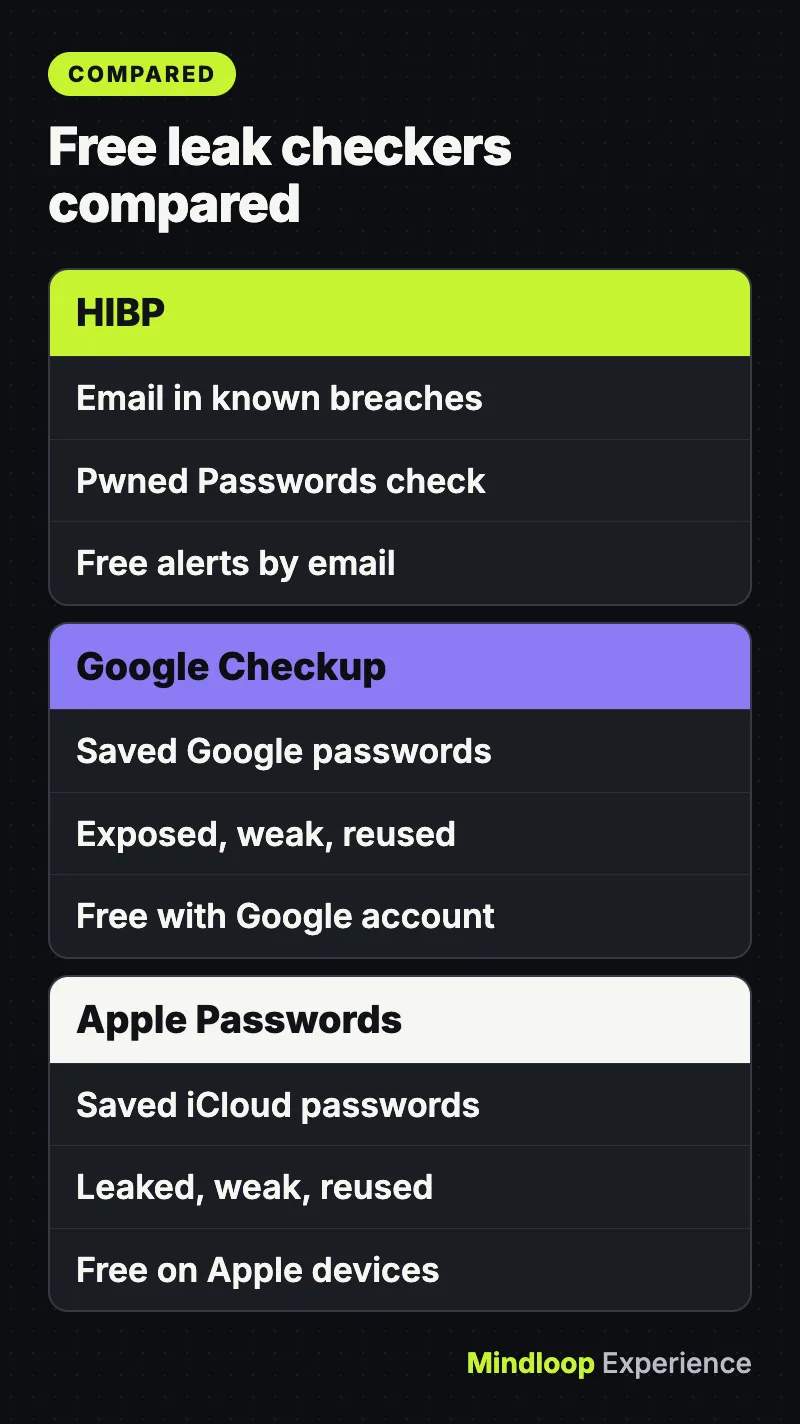
- Passwords: run the checker built into the password manager you already use: Google Password Checkup, Apple’s Passwords app, 1Password Watchtower or Bitwarden’s reports. They check every saved password against known leaks in one pass.
- Ongoing alerts: subscribe to HIBP notifications or Mozilla Monitor, which are both free.
- If you find a hit: change that password everywhere you used it, turn on two-factor authentication or a passkey, and check the account for forwarding rules and unknown devices.
Google’s dark web report, still recommended by many older guides, is gone. Google’s support page says scans for new breaches stopped on January 15, 2026, and the report stopped being available on February 16, 2026. Google now points people to Password Checkup instead.
What you need
- The email addresses you actually use, including old ones that still receive mail.
- Access to your password manager: a Google account, an iPhone, iPad or Mac, or a 1Password or Bitwarden account.
- A few minutes for the checks, and longer if you have to change several passwords.
Never type a password into a site reached from a link in an email or text.
Step 1: Search your email on Have I Been Pwned
- Go to haveibeenpwned.com and enter your email address.
- Read the list of breaches and the kinds of data each one exposed.
- Note any breach that included passwords and happened while you still used that password. Those come first on your fix list.
HIBP’s FAQ explains a few things most guides skip:
- The public search returns results for one address at a time, and HIBP says nothing is explicitly logged about the searches.
- Some breaches are flagged as sensitive. Those only show up for the verified owner of the address, who has to sign in to the HIBP dashboard to see them. A clean public result doesn’t rule them out.
- HIBP also indexes stealer logs: credentials taken by malware on infected computers. Those are searchable through its notification service and a dedicated API.
For forgotten old accounts, our guide to finding every account that uses your username helps you build the list of accounts to check.
Did you know?
Some breaches on Have I Been Pwned are flagged as sensitive and only appear to the verified owner of the email address after signing in, so a clean public search does not rule them out.
Step 2: Check a password without revealing it
HIBP’s Pwned Passwords service tells you whether a password has appeared in a breach. It’s safe to use because of a model called k-anonymity: your device hashes the password with SHA-1 and sends only the first 5 characters of the hash. The service sends back every hash suffix that starts with those characters, and your device does the final match locally. HIBP never sees the full hash, let alone the password.
The API documentation says the range endpoint is free and needs no API key or subscription. On a Mac or Linux terminal you can run the check yourself. Typing the password at a hidden prompt keeps it out of your shell history:
read -s PW
H=$(printf '%s' "$PW" | shasum -a 1 | awk '{print toupper($1)}'); unset PW
curl -s "https://api.pwnedpasswords.com/range/${H:0:5}" | grep "${H:5}"
On Linux, use sha1sum instead of shasum -a 1. If the command prints nothing, the password isn’t in the dataset. If it prints a line, the number after the colon is how many times it appears. We ran it on November 19, 2026 with the throwaway test password password, and the API returned:
1E4C9B93F3F0682250B6CF8331B7EE68FD8:52373976That’s 52,373,976 sightings. HIBP’s advice is blunt: a password found in the set should never be used, and if it’s one of yours, change it right away. A “not found” result only means that exact password isn’t in the data, not that it’s strong.
By the numbers
5 charactersof the hash sent to HIBP
52,373,976sightings of password
Step 3: Run your password manager’s built-in check
Your password manager can check every saved login at once.
Google Password Manager (Password Checkup). According to Google’s help page, Password Checkup flags passwords that are exposed, weak, or used on more than one account.
- In Chrome on a computer, select More, then Passwords and autofill, then Google Password Manager.
- On the left, select Checkup.
In any other browser, or on your phone, go to passwords.google.com and select Go to Password Checkup, then Check passwords.
Apple Passwords app (iCloud Keychain). Apple’s iPhone User Guide covers this for current iOS versions.
- Open the Passwords app and tap Security. A message on each flagged account explains the problem.
- Tap an account, then tap Change Password to update it on the website or in the app. If the site offers a passkey or Sign in with Apple, Apple suggests switching to that.
- To make sure leak monitoring is on, go to Settings, then Apps, then Passwords, and turn on Detect Compromised Passwords.
On iOS 17 and earlier there is no Passwords app. Apple’s personal safety guide gives the older path: Settings, then Passwords, then Security Recommendations.
1Password Watchtower. 1Password’s support page says Watchtower lists compromised websites (sites with a reported breach where you haven’t changed the password since), vulnerable passwords that appeared in a breach, reused and weak passwords, and logins that support 2FA or passkeys you aren’t using yet. Select Watchtower in the app sidebar or go to watchtower.1password.com.
Bitwarden. Bitwarden’s vault health reports include Exposed Passwords, Reused Passwords, Weak Passwords, Inactive 2FA and a Data Breach report. The Data Breach report, which uses HIBP, is free for all users. Most of the other reports need Premium or a paid organization. Bitwarden says the exposed-password check sends only the first five characters of the hash and does the comparison locally.
Step 4: Turn on alerts for future breaches
To hear about the next breach:
- HIBP notifications. Subscribe on haveibeenpwned.com. Alerts only go to the address being monitored, so nobody can watch an address they don’t control.
- Mozilla Monitor. Mozilla’s support article (last updated March 2026) says the paid Monitor Plus data broker removal service shut down on December 17. The free breach alerts continue, now covering up to 20 email addresses per user. Data broker scans are gone, free ones included.
Did you know?
Mozilla shut down its paid Monitor Plus service on December 17, but free Mozilla Monitor breach alerts continue and now cover up to 20 email addresses per user.
Which leak checker should you use?
| Tool | What it checks | Cost | Needs an account |
|---|---|---|---|
| Have I Been Pwned (email search) | Your email in known breaches | Free | No, but sensitive breaches need sign-in |
| HIBP Pwned Passwords | One password at a time | Free, API needs no key | No |
| Google Password Checkup | Saved passwords: exposed, weak, reused | Free | Google account |
| Apple Passwords app | Saved passwords: leaked, weak, reused | Free on Apple devices | Apple device |
| Mozilla Monitor | Up to 20 emails, ongoing alerts | Free | Yes, for alerts |
| 1Password Watchtower | Vault: breached sites, weak, reused, 2FA | Part of a 1Password plan | 1Password account |
| Bitwarden reports | Data Breach (HIBP), exposed, reused | Data Breach free, others Premium | Bitwarden account |
| Google dark web report | Discontinued February 16, 2026 | n/a | n/a |
For most people, an HIBP search plus your password manager covers it.
Found a leak? Your follow-up checklist
Start with your main email account, since it can reset every other password. If a company emailed you about a breach, our first 24 hours after a data breach notice guide covers that situation in more detail.
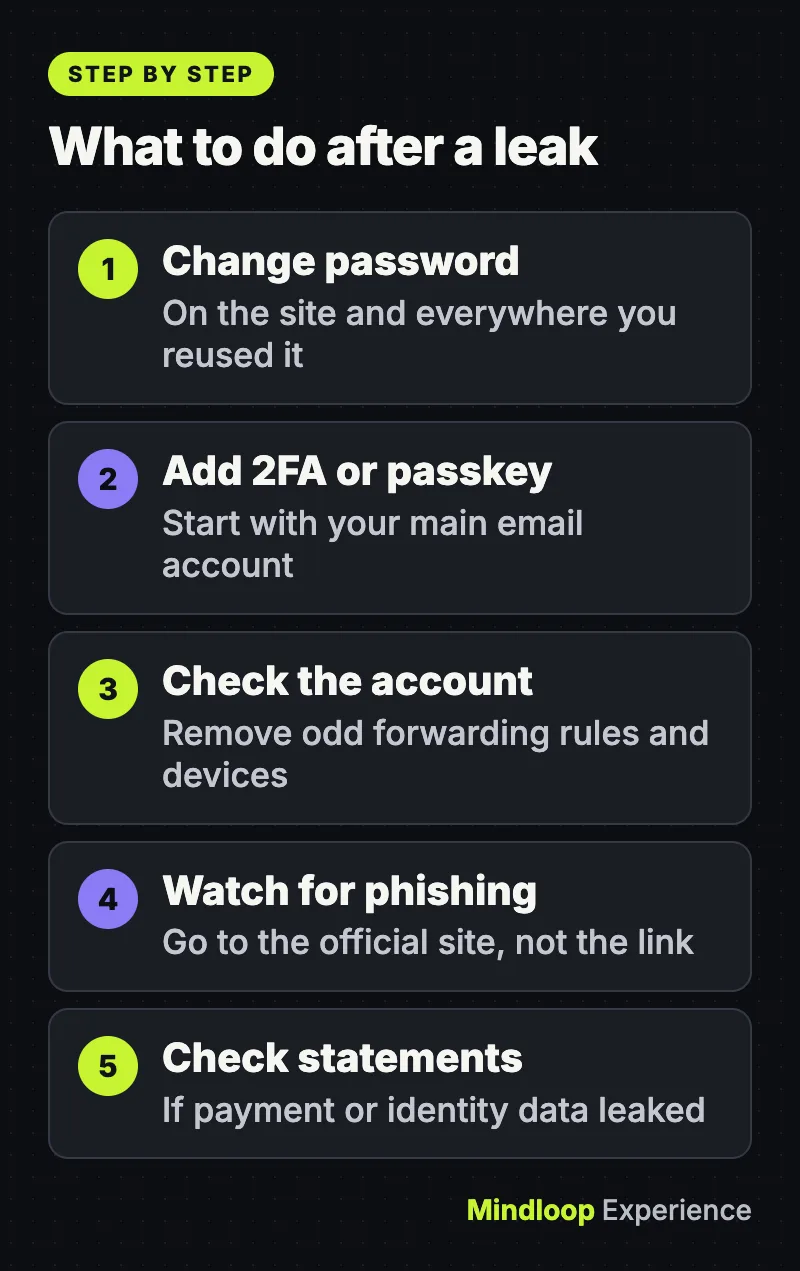
- Change the leaked password, and change it everywhere you reused it. Attackers try leaked email and password pairs on other sites. Give each site its own password, and let your password manager generate it.
- Turn on two-step verification or a passkey. The UK’s NCSC calls 2SV one of the most effective ways to protect your accounts, even if criminals know your password. Its data breach guidance also suggests a passkey where one is available.
- Check for forwarding rules, filters and unknown devices. Google’s hacked account guide says to remove unfamiliar devices and any labels, filters or forwarding rules you didn’t set up, and to check automatic mail forwarding and mail delegation. Developers should also review GitHub sessions, tokens and keys.
- Watch for phishing. The NCSC warns that criminals use breach data, and news of fresh breaches, to make scam messages look real, including fake “verify your account” emails. Contact the company through its official website, never through a link in the message. Our guide on how to spot a phishing email, text or scam call shows the warning signs.
- Check bank and card statements if any payment or identity data was in the breach.
US: credit freeze and IdentityTheft.gov
If the leak included your Social Security number or other identity data, protect your credit file too. The FTC’s credit freeze page says:
- A credit freeze is free to place and lift. It doesn’t affect your credit score, and it lasts until you lift it.
- You have to contact all three bureaus yourself: Equifax, Experian and TransUnion.
- An initial fraud alert lasts one year. You contact one bureau, and it notifies the other two. An extended fraud alert, for identity theft victims with an FTC or police report, lasts seven years.
IdentityTheft.gov has a data breach checklist. You pick each type of exposed data, such as a login, Social Security number or card, and get steps for each. If someone has already used your information, report it there to get a personal recovery plan.
UK: Report Fraud and NCSC steps
In the UK, the main steps come from the NCSC’s data breach guidance:
- Confirm you’re affected by contacting the organization through its official website or social media channels.
- Change the password if you still use it, along with any account where you reused it.
- Check your accounts for unauthorized activity, changed security settings, or logins from unusual places or times.
- Forward suspicious emails to the NCSC’s Suspicious Email Reporting Service (the address is on the NCSC page) and suspicious texts to 7726, which is free.
- If you’ve lost money, tell your bank and report it to Report Fraud, the national cyber crime and fraud reporting service for England, Wales and Northern Ireland (0300 123 2040). In Scotland, call Police Scotland on 101.
Common mistakes
- Treating “no breaches found” as an all-clear. HIBP only knows the breaches it has loaded, and sensitive ones are hidden from public search.
- Changing only the breached site’s password. If you reused it, every account with that password is at risk.
- Clicking the link in a breach alert. Fake breach notices are a classic phishing lure. Open the site or app yourself.
The bottom line
Checking takes minutes. The real protection is what follows: a unique password per account, 2FA or passkeys on your email, and a look at forwarding rules and devices. For more guides like this, see our Security section.
Frequently asked questions
Is it safe to type my password into Have I Been Pwned?
Pwned Passwords uses k-anonymity: your device hashes the password with SHA-1 and sends only the first 5 characters of the hash. The service returns matching suffixes and the final comparison happens on your device, so HIBP never sees your password.
What happened to Google’s dark web report?
Google stopped scanning for new dark web breaches on January 15, 2026 and removed the report on February 16, 2026. It now points people to Password Checkup, Security Checkup, Google Password Manager and passkeys.
Does a credit freeze hurt my credit score?
No. The FTC says a credit freeze is free to place and lift, does not affect your credit score and lasts until you lift it. You have to contact Equifax, Experian and TransUnion separately.
Where do I report fraud after a data breach in the UK?
If you lost money, tell your bank and report it to Report Fraud, the service for England, Wales and Northern Ireland, online or on 0300 123 2040. In Scotland, call Police Scotland on 101. Forward scam texts to 7726.
Quick quiz
How much of your password’s hash does Pwned Passwords send?
- The whole hash
- The first 5 characters
- None, it sends the password
The range API only receives the first 5 characters of the SHA-1 hash and your device matches the rest locally.
In the US, how many credit bureaus must you contact to freeze your credit?
- All three
- One, it tells the others
- None, the FTC does it
The FTC says to contact Equifax, Experian and TransUnion yourself; only fraud alerts are passed on by one bureau.
Which tool was discontinued in February 2026?
- Mozilla Monitor breach alerts
- Have I Been Pwned
- Google’s dark web report
Google removed the dark web report on February 16, 2026; Mozilla’s free alerts and HIBP continue.
Sources
Links last checked on November 19, 2026.
- Have I Been Pwned: FAQs
- Have I Been Pwned: API v3 documentation (Pwned Passwords range API)
- Google Account Help: Change compromised passwords (Password Checkup)
- Google Search Help: Learn about updates to dark web report
- Apple iPhone User Guide: Change weak or compromised passwords
- Mozilla Support: Monitor Plus has shut down
- FTC: Credit Freezes and Fraud Alerts
- NCSC: Data breaches, guidance for individuals and families


Write a response