Big US banks are rewriting their online banking terms for AI agents, and the message is the same each time: if you let a third-party agent into your account, what it does is on you. Here is what six banks have actually said, what federal rules say about access you hand to someone else, a checklist for connecting any agent, and what to do if one already moved money. As of November 20, 2026.
Key takeaways
- Citi and Chase terms, and Wells Fargo terms from November 24, 2026, say you are responsible for what a third-party AI agent does in your account.
- Citi treats agent actions as authorized by you, even if the credentials you gave the agent later leak.
- Regulation E generally does not treat transfers by someone you gave access to as unauthorized, and it does not mention AI agents.
- Keep agents away from your password, use read-only or small accounts, set alerts, and revoke in writing with proof.
This is general information, not legal or financial advice.
What happened
On November 18, 2026, TechCrunch reported that Citibank had changed its terms of service that week, telling customers who use third-party AI tools that anything that goes wrong is their problem, “even if they get hacked.” A Citi spokesperson told TechCrunch: “We recently updated our Online User Agreement to provide greater clarity about those risks,” adding that “customers who choose to grant account access to third-party AI agents are responsible for activities conducted through those agents.”
The same report said PNC “changed its terms today,” that Citizens emailed customers that week warning they are on the hook for anything their AI assistant does (according to an email TechCrunch saw), and that JPMorgan and Bank of America “announced similar policies last month.”
The Bank of America part goes back to October 27, 2026, when TechCrunch published a customer email titled “Protecting your finances in the AI World.” According to TechCrunch, it asked customers never to share their username and password with another person or an outside service, “including an AI-enabled tool or agent that offers to act on your behalf,” and warned: “If you do share your credentials, keep in mind that you’re responsible for activity resulting from that access.” A bank spokesperson confirmed the email was authentic.
Airlines are pushing back too (United bans AI agents from booking flights), even as tools like ChatGPT Wallet let agents pay for you.
What each bank has said
We read each bank’s posted terms on November 20, 2026 where we could open them. Citizens’ website blocked our check, and we could not locate Bank of America’s online banking agreement, so those two rows rely on the emails TechCrunch reported.
| Bank | What it said | Source | Primary doc found? |
|---|---|---|---|
| Citi | Agreement “last updated November 2026”; third-party agent actions treated “as authorized by You,” including after leaked credentials; Citi’s own agent tools excluded | Citi Online User Agreement | Yes |
| JPMorgan Chase | You are responsible if an agent misreads instructions, “performs unintended actions or exceeds the authority you gave it”; agents must identify themselves | Chase website Terms of Use | Yes (section undated) |
| Wells Fargo | Agent actions using your login are “deemed to have been initiated and authorized directly by you”; you must keep proof you revoked an agent | Upcoming Online Access Agreement, effective November 24, 2026 | Yes |
| Bank of America | Don’t share credentials with an AI agent; “you’re responsible for activity resulting from that access” | Customer email, via TechCrunch | Not located; email only |
| PNC | Changed its terms on November 18, according to TechCrunch | TechCrunch | No: the posted agreement is dated July 25, 2025, with no AI-agent wording |
| Citizens | Emailed customers that they are on the hook for their AI assistant’s actions | TechCrunch | Site blocked our check; email only |
The Citi Online User Agreement now has a section titled “Use of Third-party Artificial Intelligence (‘AI’) Agents.” It cautions you against using any third-party agent at all, and says that if you give one your login, “Citi will consider any access and actions taken by the agent as authorized by You.” If those credentials are “further shared, leaked, or otherwise distributed,” Citi treats that access as authorized too. The section carves out agent tools that Citi itself provides in Citi Online or Citi Mobile, and its liability sentence ends with “except as otherwise permitted under applicable law.”
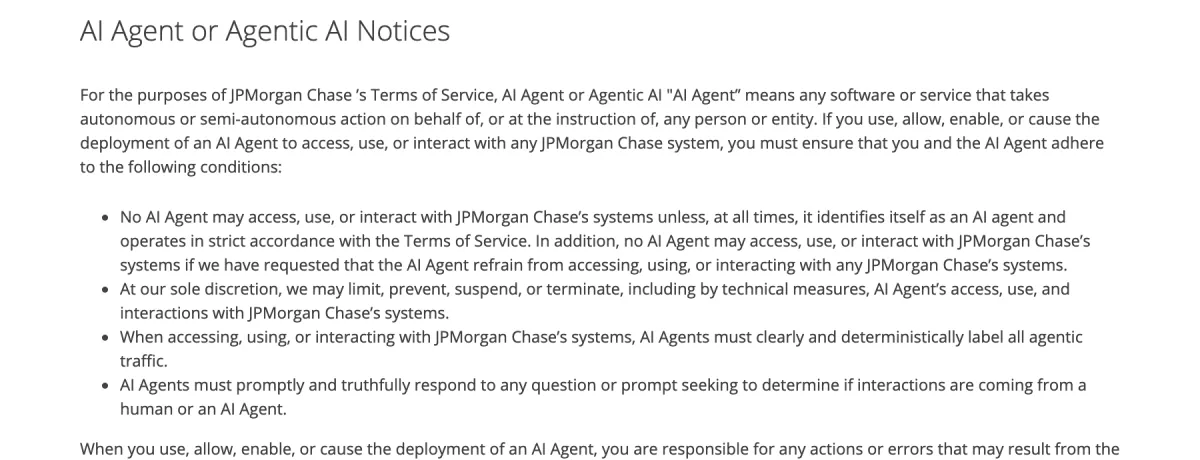
The Chase Terms of Use have a section called “AI Agent or Agentic AI Notices.” Agents must identify themselves and “clearly and deterministically label all agentic traffic,” and Chase may “limit, prevent, suspend, or terminate” their access. The page gives no date for this section.
The Wells Fargo upcoming Online Access Agreement, effective November 24, 2026, adds a section on AI agents. It says your use of an agent is “AT YOUR OWN RISK” and that until you notify the bank you revoked an agent, “you remain responsible for all the AI Agent’s activities, to the extent permitted by law or regulation.” Its summary covers these duties “if and when we permit the use of such agents.”
For PNC, the Digital Services Agreement PDF posted on its site is marked “Effective July 25, 2025” and contains no AI-agent language as of November 20, 2026, so we could not find PNC’s new wording.
Did you know?
PNC’s Digital Services Agreement posted on its site is still marked effective July 25, 2025 and has no AI-agent wording, even though TechCrunch reported PNC changed its terms on November 18.
Why banks can say this: Regulation E in plain English
US consumer protection for electronic transfers comes from Regulation E. Its definition of an unauthorized electronic fund transfer (section 1005.2(m)) is a transfer “initiated by a person other than the consumer without actual authority” from which you receive no benefit. The key exclusion: it does not cover a transfer made “by a person who was furnished the access device to the consumer’s account by the consumer, unless the consumer has notified the financial institution that transfers by that person are no longer authorized.” An access device includes a “code,” such as your login.
The official interpretation (comment 2(m)-2) gives the human version: if you hand your access device to someone, such as a family member, and they go beyond the authority you gave them, you are “fully liable for the transfers” unless you have told the bank they are no longer authorized. Comment 2(m)-3 adds that access obtained from you through robbery or fraud does count as unauthorized.
Regulation E does not mention AI agents. Whether an agent that misreads a prompt, gets tricked, or leaks your password counts as “a person” you furnished access to is untested, and no regulator page we found answers it. Citi and Wells Fargo both leave room for whatever the law requires. Treat it as open and plan for the worst case.
Did you know?
Under Regulation E, if you give someone your access device and they go beyond the authority you gave them, you are fully liable for the transfers unless you told the bank they are no longer authorized.
Before you connect an AI agent to a bank account
Run this before giving any agent access, from budgeting assistants to browser agents that log in for you.
- Prefer the bank’s own tools. Citi’s terms exclude agent features Citi provides inside its app. If your bank offers its own assistant or an official connection, use that instead of handing a third party your login.
- Never paste your username and password into an agent. Under Citi’s and Wells Fargo’s wording, that step makes everything the agent does “authorized.”
- Ask for read-only access. If the job is budgeting or spending analysis, the agent does not need to move money. Choose view-only access and decline payment permissions.
- Use a separate low-balance account. If an agent must pay for things, point it at a checking account that holds only what you are willing to lose, with no overdraft line linked to savings.
- Turn on alerts. Set alerts for every outgoing transfer, new payee, password change and new-device login.
- Lock down the login itself. Turn on two-factor authentication for your bank and your email, and check whether your email or password has leaked before trusting any tool with them.
- Know how to cut it off. Find where to remove the agent, in its settings and your bank’s connected apps, and how to change your password fast.
- Revoke in a way you can prove. Wells Fargo’s upcoming terms say you “must retain evidence of such revocation” and give it to the bank on request. Regulation E’s exclusion also turns on telling the bank that transfers by that person “are no longer authorized.” Call the bank, then follow up in writing, and keep copies and the date.

Bank’s own agent vs. giving an agent your password
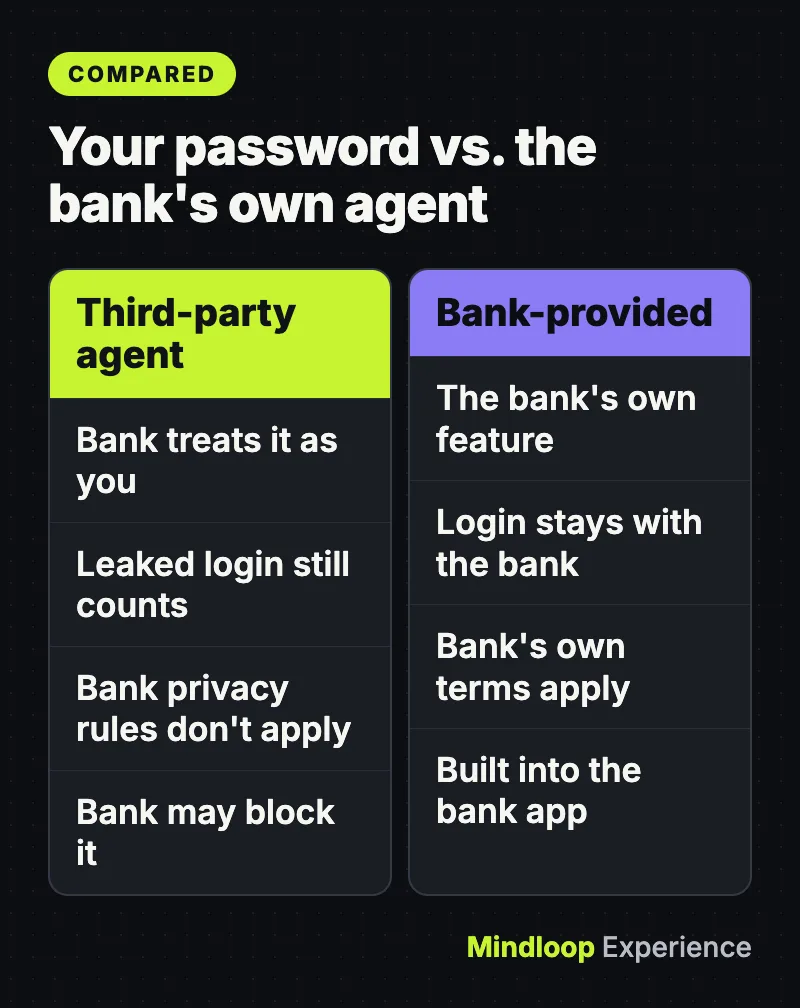
| Question | Your password in a third-party agent | Bank-provided agent or official connection |
|---|---|---|
| Who the bank treats as acting | You (Citi and Wells Fargo terms) | The bank’s own feature |
| If the agent leaks your login | Citi treats later access as authorized by you | Your login is not handed to an outside tool |
| Whose privacy rules apply | Not the bank’s (Citi, Wells Fargo) | The bank’s own terms and notices |
| Can the bank block it? | Yes, Chase, Citi and Wells Fargo reserve the right | It is the bank’s own tool |
| Can you limit it to viewing only? | Depends on the agent | Check the bank’s settings |
If an agent already moved money
Act quickly. Timing matters under Regulation E if a transfer turns out to count as unauthorized.
- Stop the agent. Turn it off or delete the task in the agent app, and remove its access in your bank’s connected apps if listed.
- Change your bank password and sign out other sessions, then change the password on any account that shares it.
- Call your bank’s fraud line. Say an outside AI tool made transfers you did not intend and is no longer authorized, and ask the bank to block further transfers and note the time of your call.
- Follow up in writing through secure message or mail, listing each transfer, amount and date, and keep a copy. Regulation E section 1005.6 lets you notify a bank “in person, by telephone, or in writing,” so the written note is your record, not a legal requirement.
- Ask whether the bank treats it as unauthorized. If it does, section 1005.6 caps your liability for unauthorized transfers involving a lost or stolen access device at $50 when you report within 2 business days of learning of it, and generally at $500 after that. For unauthorized transfers on a statement, report within 60 days of the statement being sent, or you may be liable for later transfers. These caps apply only to unauthorized transfers, and whether an agent’s transfer qualifies is the open question above.
If the problem is an outage rather than an agent, our guide to stuck transfers and Zelle payments during a bank outage covers that case.
By the numbers
$50cap if reported in 2 business days
$500general cap after that
60 daysto report statement errors
Common mistakes
- Assuming “unauthorized” means “I didn’t want it.” Under Regulation E, a transfer by someone you gave access to is generally not unauthorized, even if they exceeded what you asked.
- Only revoking inside the agent app. The rule and the new terms turn on notifying the bank. Deleting the app does not tell the bank anything.
- Reading old terms. Citi’s agreement changed in November 2026 and Wells Fargo’s changes on November 24, 2026.
- Forgetting about your data. Citi and Wells Fargo say their privacy policies do not cover the agent; read the agent maker’s terms.
When to get advice
If your bank refuses to reverse a transfer you think it should:
- File a CFPB complaint at consumerfinance.gov/complaint. The CFPB sends it to the company and says “most companies respond within 15 days.” You can also call (855) 411-2372.
- Contact the bank’s regulator. For national banks and federal savings associations, the OCC runs HelpWithMyBank.gov, which has a bank lookup and complaint form. State-chartered banks are overseen by your state’s banking regulator.
- Talk to a consumer lawyer or legal aid office if a large amount is at stake, or if your account agreement’s arbitration clause or deadlines apply. Wells Fargo’s agreement, for example, includes binding arbitration for most disputes.
More money guides: Mindloop Money.
The bottom line
Banks are making you carry the agent risk. Keep agents away from your password, give them read-only or small-account access, turn on alerts, and when you stop using one, tell the bank and keep proof. Until a regulator or court says how Regulation E fits AI agents, that is the safest way to use them.
Frequently asked questions
Am I liable if my AI agent sends money to the wrong person?
Under the new Citi, Chase and Wells Fargo terms, the bank treats an agent you gave access to as acting for you. Regulation E generally does not treat transfers by someone you furnished access to as unauthorized, but it does not mention AI agents, so the question is not settled.
Can I give ChatGPT or another AI agent my bank password?
Bank of America and Citi warn against it, and Wells Fargo’s upcoming terms say agent use is at your own risk. Citi says that if you share your login with a third-party agent, it will treat the agent’s actions, and any later use of leaked credentials, as authorized by you.
How do I revoke an AI agent’s access to my bank account?
Turn the agent off and remove it from your bank’s connected apps, change your password, then call the bank to say the agent is no longer authorized and follow up in writing. Wells Fargo’s upcoming terms say you must keep evidence of the revocation.
Where can I complain if my bank won’t refund an agent transfer?
File a complaint with the CFPB at consumerfinance.gov/complaint, which forwards it to the bank. National banks and federal savings associations are also covered by the OCC’s HelpWithMyBank.gov; state-chartered banks by your state banking regulator.
Quick quiz
What does Citi say about agent actions after your shared login leaks?
- Citi covers the loss
- They count as authorized by you
- The agent maker pays
Citi’s agreement says it will consider access with leaked credentials as authorized by you.
When does Wells Fargo’s new AI-agent section take effect?
- July 25, 2025
- November 18, 2026
- November 24, 2026
The upcoming Online Access Agreement is effective November 24, 2026.
Which agent tools does Citi’s new section exclude?
- Agent tools Citi itself provides
- All browser agents
- Agents from big AI companies
Citi says the terms do not apply to agent tools or features Citi provides through Citi Online or Citi Mobile.
Sources
Links last checked on November 20, 2026.
- Citi Online User Agreement
- Chase website Terms of Use
- Wells Fargo Online Access Agreement, effective November 24, 2026
- CFPB: Regulation E, 12 CFR 1005.2 Definitions
- CFPB: Official interpretation of 1005.2
- CFPB: Regulation E, 12 CFR 1005.6 Liability of consumer
- TechCrunch: More banks say customers using AI agents are on their own
- TechCrunch: Bank of America asks customers not to share passwords with AI assistants



Write a response