Mem, the AI notes app, is closing. Its founder announced on November 16, 2026 that Mem will shut down on January 15, 2027, and notes become read-only a month earlier, on December 18. If years of meeting notes, drafts and saved links live in Mem, you have about 60 days to get them out. This guide shows the safest order: a complete copy first, then the move to Obsidian, Notion, Apple Notes, Google Docs, OneNote, Bear or Evernote, then a check that nothing went missing.
Key takeaways
- Mem notes become read-only on December 18, 2026, and Mem shuts down on January 15, 2027.
- Start with a full Markdown copy from Settings, Exports, My Computer, and tick audio if you need recordings.
- Each destination keeps different things: collections can become tags and links between notes can arrive as plain text.
- Check the move with a familiar note, a collection, an attachment and a meeting transcript before you delete the ZIP.
What Mem announced, and what it hasn’t said
Here is the timeline from Mem’s announcement and its help center:
| Date | What happens |
|---|---|
| November 16, 2026 | Shutdown announced. All charging is paused. |
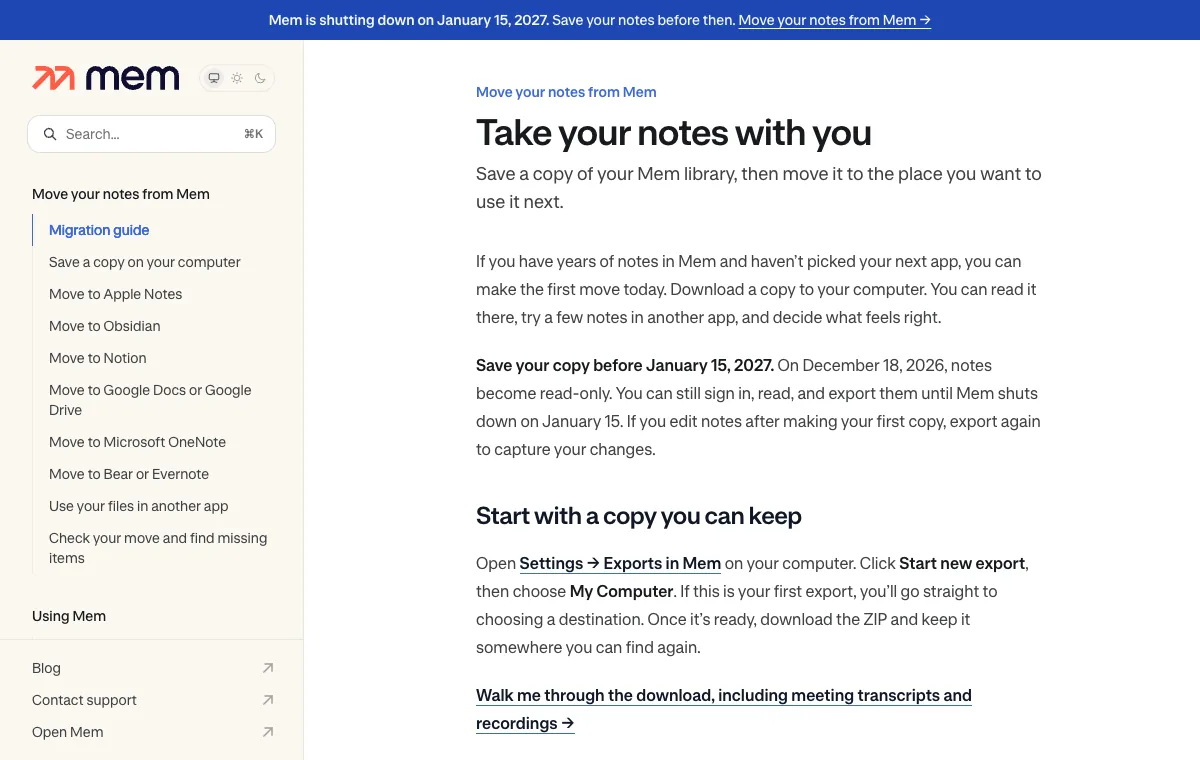
| December 18, 2026 | Notes become read-only. You can’t create or edit notes, but you can still sign in, read and export. |
| January 15, 2027 | Mem shuts down. You can’t access it after this date. |
Mem says “You won’t be charged again,” and that the paid features and limits you paid for are honored until the app closes. The announcement calls it a “difficult decision” but gives no other reason.
As of November 17, 2026, Mem’s announcement and help pages don’t say:
- whether prepaid annual plans get a partial refund;
- when stored data is deleted after January 15;
- what happens to the Mem API, Zapier, the Mem app for ChatGPT or the MCP connector before the shutdown.
If any of these matters to you, ask support@mem.ai (the address on Mem’s help pages) in writing and keep the reply. Plan on every Mem integration going quiet by January 15 at the latest.
A note on testing: the steps below come from Mem’s own help center, read on November 17, 2026. We don’t have a Mem library to export, so we haven’t run them ourselves.
By the numbers
60 daysroughly, to get your notes out
December 18notes become read-only
January 15Mem shuts down
Step 1: Save a complete Markdown copy first
Do this before you pick a new app. It gives you a copy you can read in any text editor, even if a later import goes wrong. Mem’s download guide says to use a computer, not your phone:
- Sign in to the Mem account whose notes you want to keep and open Settings → Exports (mem.ai/settings/exports).
- Click Start new export. Choose My Computer → Next.
- If you recorded meetings, look at the options before you go on. Transcripts are included by default where available; the original audio is a separate option you have to select. Audio can make the download much larger.
- Click Start export. Large libraries take a while. If another export is already preparing, let it finish first.
- Back in Exports, click Download when the entry is ready.
- Unpack the ZIP (double-click on a Mac; right-click and Extract All on Windows). Keep both the ZIP and the folder until you’ve checked your move.
Inside the folder you’ll find:
| Folder or file | What’s in it |
|---|---|
notes/ | One Markdown (.md) file per note |
collections/ | An index for each collection, linking to its notes. A note in two collections shows up in both indexes. |
attachments/ | Files your notes refer to. Keep this folder next to the others so links still work. |
export-report.md (if present) | What Mem couldn’t include. Read this first. |
Edited notes after your first export? Export again before December 18 to capture the changes.

Step 2: Choose where your notes go
Mem has a route for each popular app, and they don’t all keep the same things. This table brings together what Mem’s destination pages say:
| Destination | How it gets there | Watch out for |
|---|---|---|
| Obsidian | Open the Markdown folder as a vault | Pick the folder that contains notes/, not notes/ itself |
| Notion | Direct transfer, or import the ZIP yourself | Use one method only, or you get duplicate pages |
| Apple Notes | ENEX file, or Markdown import on macOS Tahoe 26+ | Collections may not become folders; links can turn into plain text |
| Google Docs / Drive | Direct transfer to Docs, or upload the folder to Drive | Drive keeps the files as Markdown, not editable Docs |
| OneNote | Direct transfer to a notebook | Large libraries can take hours; check every numbered section |
| Bear / Evernote | ENEX file (collection names become tags) | Keep the Markdown copy if links between notes matter |
You can use more than one. Mem suggests, for example, a complete copy in Google Drive plus only your writing in a notes app. Work from a copy of the unpacked folder and leave the original ZIP alone.
If plain files are what you want after this, Obsidian is the simplest landing spot: Mem says the download is already in the right format. On the Hacker News thread about the shutdown, readers pointed out that an Obsidian vault is just a folder, so any service that syncs files can carry it between computers.

Step 3: Move your notes to the new app
Obsidian
Move the unpacked folder where you want to keep it. In Obsidian’s vault switcher, choose Open folder as vault. Then select the outer folder, the one that contains notes/, collections/ and the attachments. Open a collection index and follow a link to check it. (Mem’s Obsidian steps, Obsidian’s vault help.)
Notion
In Mem’s Exports, choose Notion → Next. Leave Create pages in Notion selected, click Connect account, pick the right workspace and grant access to the page where the export should land. Click Start export, then Open in Notion and look for a page named “Mem export”. Prefer to import it yourself? Choose Download a file to import, leave the ZIP zipped, and in Notion open Settings → Import → Text & Markdown. (Mem’s Notion steps.)
Apple Notes
In Exports, choose Apple Notes → Next, pick the meeting material, and start the export. Download the .enex file (no Evernote account needed). On your Mac, choose File → Import to Notes in Notes and select it. Notes land in Imported Notes; pick your iCloud account if you want them on your iPhone too. (Mem’s Apple Notes steps, Apple’s import guide.)
Google Docs, OneNote, Bear and Evernote
- Google Docs: choose Google Docs → Next, connect the Google account you want (it can differ from your Mem login), start the export, then open the “Mem export” folder in Drive and read a note you know well.
- OneNote: choose OneNote → Next, connect the Microsoft account that holds your notebook (check work vs personal), and start the export. Look for sections named “Mem export”; the Mem export summary page lists the page count and items to review.
- Bear or Evernote: choose either one to get an ENEX file. In Bear on Mac, use File → Import From → Evernote. In the Evernote desktop app, use File → Import.
Joplin, iA Writer, Typora, VS Code, Dropbox and OneDrive can all open or store the Markdown folder directly, per Mem’s other-apps page.
Step 4: Check that everything arrived
A “ready” export can still be missing an attachment or a transcript. Mem’s check-your-move page suggests a quick test in the new app:
- Search for a note you remember writing and read a paragraph from the middle.
- Open a collection index and find a note that belonged to two collections. ENEX-based apps may show tags instead.
- Open a photo or PDF from inside a note. If the link fails, look for the file in the extracted folder.
- Find a meeting by title, open its transcript, and play the audio if you included it. No sound? Make another export with audio selected while Mem is still open.
If an export says Couldn’t finish, use Retry or reconnect the same destination account. If it says Needs attention, open the result and use Download original ZIP if offered.
Did you know?
In Mem’s Markdown download, a note that belonged to two collections appears in both collection indexes, while apps that import the ENEX file may show those collections as tags instead.
Common mistakes and fixes
| Mistake | What happens | Fix |
|---|---|---|
| Opening only notes/ as the Obsidian vault | Collections and attachments sit outside the vault | Open the outer folder instead |
| Importing the same files into Notion twice | A second set of pages | Use one method per set of notes |
| Skipping the audio option | Transcripts but no recordings | Export again with audio selected |
| Moving a note without its attachments folder | Broken image and PDF links | Keep notes/, collections/ and attachments/ together |
| Wrong Microsoft or Google account in the picker | Notes land in the wrong place | Check the address before you start the export |
| Waiting until January | No editing after December 18, no access after January 15 | Make the Markdown copy this week |
What it means for you
Mem is a reminder that a notes app you rely on can disappear. Mem gave two months’ notice, stopped billing and wrote step-by-step help. Not every app will. A few habits make the next shutdown painless:
- Export on a schedule. Every few months, download your notes from whatever app you use and keep the file next to your other backups.
- Prefer apps that export plain files. Markdown folders and ENEX files open in many apps; a proprietary database doesn’t.
- Keep meetings in two places. If an AI note taker records your calls, save the transcripts you need somewhere you control.
- Watch the dates. Put December 18 and January 15 in your calendar now.
If you used Mem for AI meeting notes, our guide to using Claude Meetings in Google Meet covers one replacement. For another AI feature that’s being retired, see how to switch from ChatGPT’s old voice modes. Keeping your AI tools on your own computer is another route: see how to run a model locally with Ollama. More step-by-step help is in AI Guides.
Frequently asked questions
When is Mem shutting down?
Mem shuts down on January 15, 2027. Notes become read-only on December 18, 2026: after that you can still sign in, read and export, but you can’t create or edit notes. After January 15 you can’t access Mem at all.
Will Mem keep charging me until it closes?
No. Mem says all charging is paused and you won’t be charged again, and the paid features and limits you paid for are honored until the app closes. Its announcement doesn’t say whether prepaid annual plans get a partial refund.
What is the best app to move Mem notes to?
It depends on how you work. Obsidian opens Mem’s Markdown download as a vault with no conversion. Notion, Google Docs and OneNote get a direct transfer. Apple Notes, Bear and Evernote import an ENEX file. You can use more than one.
Can I export my Mem notes from my iPhone?
Mem’s download guide tells you to export on a computer: sign in, open Settings, then Exports, and start a new export there. Use a computer rather than your phone.
Quick quiz
What can you still do in Mem after December 18, 2026?
- Create new notes
- Read and export notes
- Nothing at all
Notes become read-only on December 18, but you can still sign in, read and export them until January 15, 2027.
Which folder should you open as an Obsidian vault?
- Only notes/
- Only attachments/
- The folder that contains notes/
Choosing only notes/ leaves collections and attachments outside the vault.
What does Mem’s Markdown export include by default for meetings?
- Transcripts, where available
- Audio recordings
- Nothing about meetings
Transcripts are included by default; audio is a separate option you must select before exporting.
Sources
- Mem is shutting down (Mem blog, November 16, 2026)
- Take your notes with you (Mem Help Center migration guide)
- Save a copy on your computer (Mem Help Center)
- Check your move and find missing items (Mem Help Center)
- Move to Obsidian (Mem Help Center)
- Move to Apple Notes (Mem Help Center)
- Import or share notes and files to the Notes app (Apple Support)
- Hacker News discussion of the shutdown



Write a response